GraphQL Requests
DevTools ships a first-class GraphQL request editor alongside the HTTP editor. Use it when your API speaks GraphQL — you get a dedicated query pane, variables, headers, assertions, and response history, all with the same import/export, delta, and flow-node support as HTTP.
Creating a GraphQL Request
Create a new file of type GraphQL in the workspace sidebar. It opens in its own tab with four panes: Query, Variables, Headers, Assertion.
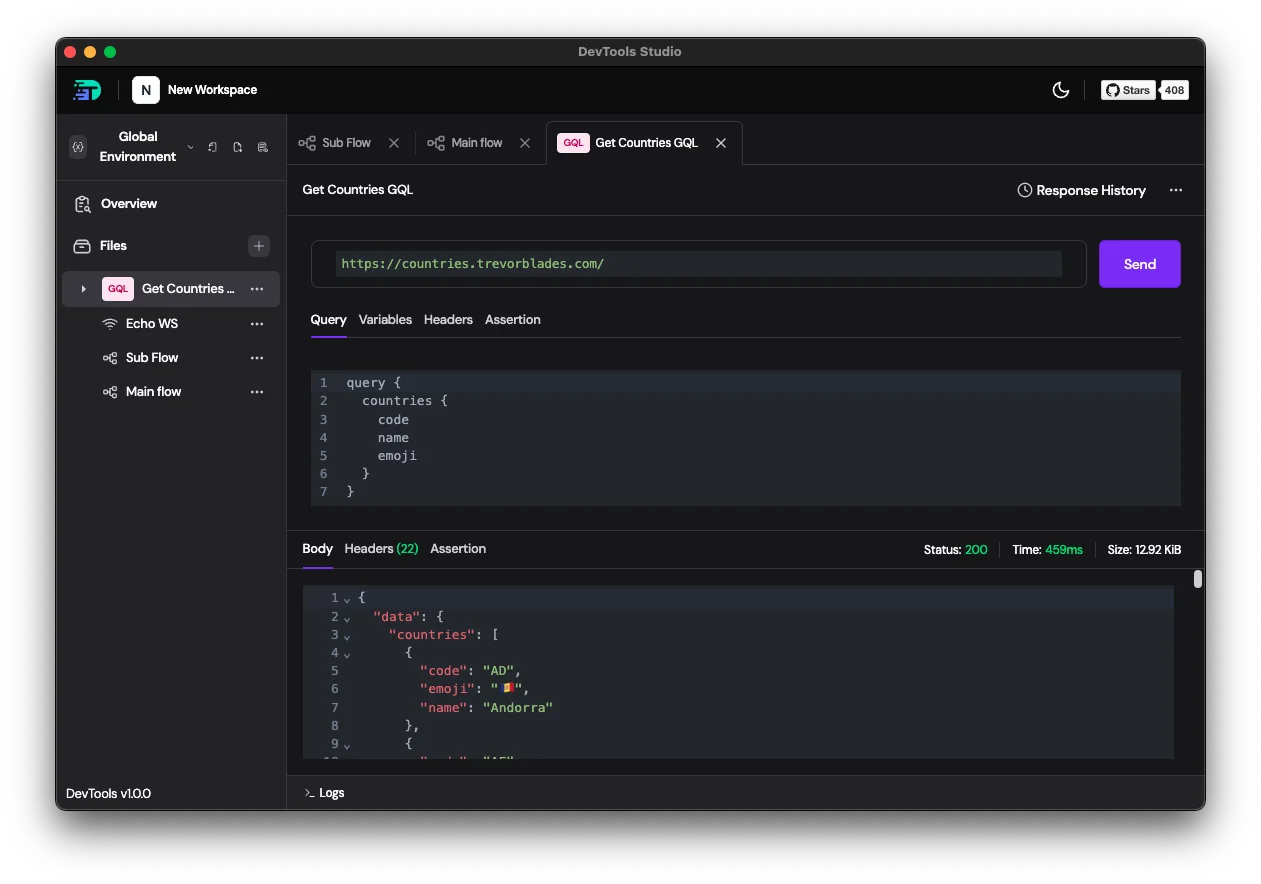
Editor surface:
- URL — the GraphQL endpoint. Supports
{{BASE_URL}},{{#env:API_URL}}, and the other variable forms. - Query — the GraphQL operation. Syntax-highlighted.
- Variables — GraphQL variables as a JSON object. Referenced with
$namein the query. - Headers — request headers. Use this for
Authorization,X-Api-Key, etc. - Assertion — response-body assertions evaluated after each send (same syntax as HTTP assertions).
- Send — fires the request. The result pane below shows Body / Headers / Assertion with status, time, and size.
- Response History — every previous send is recorded and replayable, same as HTTP.
Example
Query countries.trevorblades.com for a list of country codes and flags:
query {
  countries {
    code
    name
    emoji
  }
}
Click Send → the response pane shows a 200 with a JSON body under data.countries. Each send is added to Response History.
Using Variables
Variables let you parameterise a query:
query GetCountry($code: ID!) {
  country(code: $code) {
    name
    emoji
    capital
  }
}
In the Variables pane:
{
  "code": "{{country_code}}"
}
{{country_code}} is resolved from your active environment at send time. You can reference any variable form supported in request fields — env refs, node outputs, {{ faker.* }}, {{ uuid() }}, etc.
Using a GraphQL Request in a Flow
Drag a GraphQL request onto a flow canvas (or add a GraphQL node from the flow toolbar) to execute it as part of a multi-step scenario. In-flow it has the same configuration surface as the standalone editor plus Evaluated / Browse schema inspection.
See GraphQL Node in Working with Flows for node-specific details.
Accessing the Response
Whether called standalone or in a flow, the response structure is:
{{NodeName.response.status}}                 # e.g. 200
{{NodeName.response.body.data.<field>}}      # GraphQL payload — always under .data
{{NodeName.response.body.errors}}            # array when the server returns errors
{{NodeName.response.headers.Content-Type}}
{{NodeName.response.duration}}               # ms
Example chaining:
- graphql:
    name: GetMe
    url: '{{API_URL}}'
    query: 'query { me { id email } }'

- request:
    name: FetchProfile
    method: GET
    url: '{{API_URL}}/users/{{GetMe.response.body.data.me.id}}'
    depends_on: GetMe
YAML Format
- graphql:
    name: GetCountries
    url: 'https://countries.trevorblades.com/'
    headers:
      Content-Type: application/json
    query: |
      query {
        countries {
          code
          name
          emoji
        }
      }
    variables: {}
Assertions
GraphQL responses follow the convention of returning 200 even for errors (errors land in response.body.errors). Assert on .data and .errors, not just status:
response.status == 200 &&
!response.body.errors &&
response.body.data.countries.length > 0
Response History
Click Response History in the top-right to browse prior sends. History is per-request, capped, and pruneable — same behaviour as HTTP response history.
Delta Overrides
Like HTTP requests, GraphQL requests support delta overrides — you can override the query, variables, headers, or assertions at a per-flow-node or per-environment level without mutating the source request. See the Delta system for details.
Next: See Working with Flows to wire GraphQL requests into multi-step scenarios, or Environments & Variables for the full variable system.