
 Star on GitHub
Multi-Step API Testing
Real APIs don't work in isolation. Authentication flows, resource creation, data validation — they all depend on chaining multiple requests together. Multi-step API testing validates these complete workflows end-to-end.
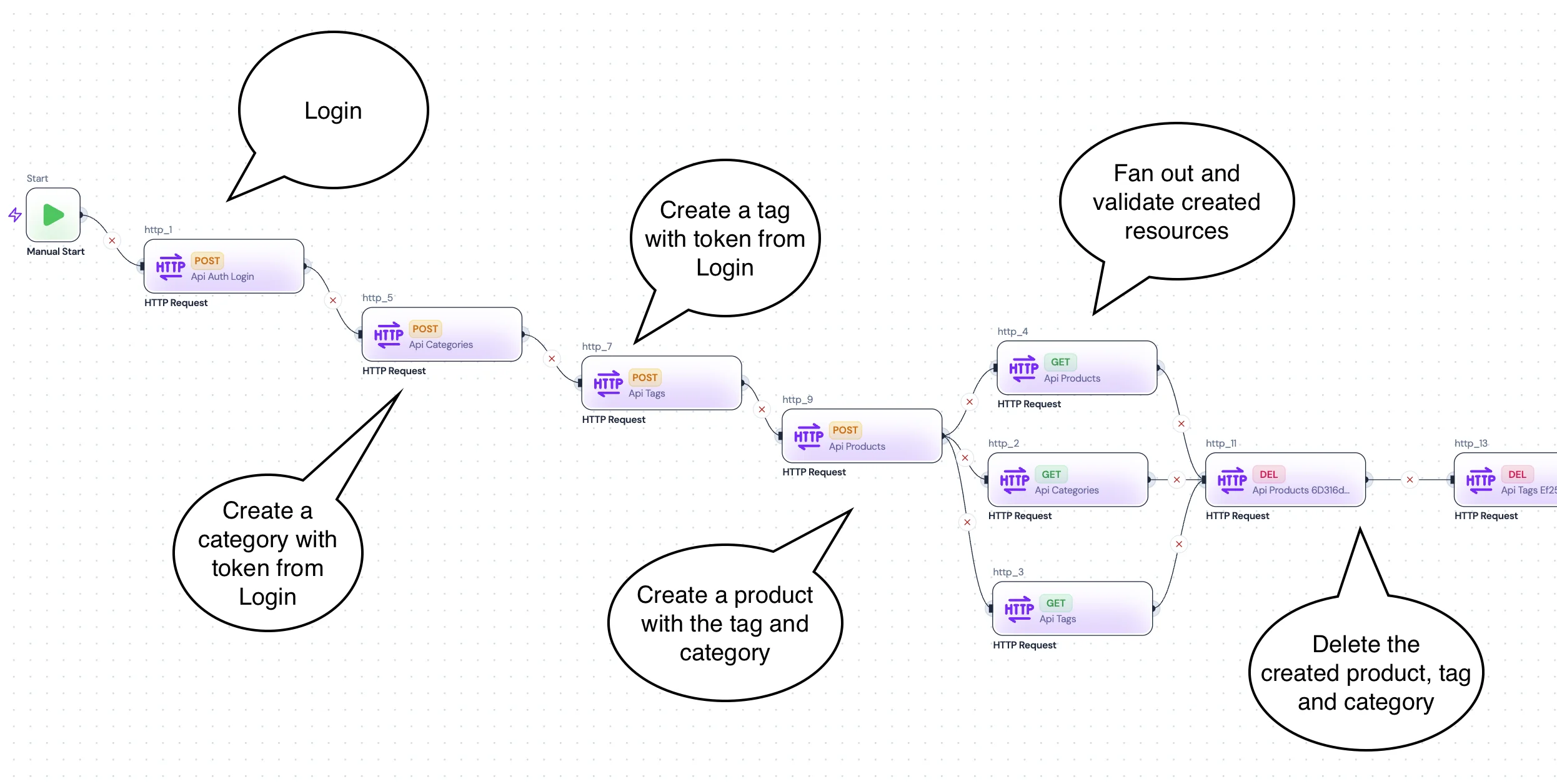
What is multi-step API testing?
Multi-step API testing (also called end-to-end API testing or API flow testing) is the practice of testing a sequence of API calls that depend on each other — where outputs from one step become inputs for the next.
A typical multi-step test might look like:
- Login — POST to /auth/login, receive an access token
- Create resource — POST to /api/items using the token
- Verify — GET the created resource by ID
- Clean up — DELETE the resource
Each step depends on data from the previous step. The token from login is used in subsequent requests. The ID from creation is used to verify and delete.
Why multi-step testing matters
Single-request tests miss real bugs
Testing endpoints in isolation catches basic errors but misses the bugs that happen when requests interact: token expiry between steps, race conditions, incorrect ID references, and state mutation side effects.
Real user workflows are multi-step
Users don't call a single endpoint — they login, browse, create, update, and logout. Multi-step tests mirror these real workflows and catch integration issues before they reach production.
Variable chaining is the hard part
The challenge isn't making API calls — it's passing data between them. Tokens, IDs, timestamps, and session data need to flow from response to request across steps reliably.
How DevTools handles multi-step API testing
Import real traffic
Record a HAR from Chrome DevTools, import it, and DevTools generates multi-step flows automatically — complete with request ordering and dependency detection.
Auto-map variables between steps
DevTools detects tokens, IDs, and values that flow between requests and maps them automatically. Override with JSONPath rules when needed.
Add assertions and validation
Use JavaScript nodes to validate status codes, response bodies, and data integrity between steps. Assertions run inline within the flow.
Export YAML and run in CI
Export the flow as human-readable YAML, commit to Git, and run with the DevTools CLI in any CI/CD pipeline. Parallel execution with JUnit/JSON reports.
Variable passing between steps
In DevTools, variables flow naturally between steps using double-curly-brace syntax:
# Login returns an access_token in the response body
- request:
    name: Login
    method: POST
    url: '{{BASE_URL}}/auth/login'
    body:
      email: '{{#env:TEST_EMAIL}}'
      password: '{{#env:TEST_PASSWORD}}'

# Use the token in subsequent requests
- request:
    name: CreateItem
    method: POST
    url: '{{BASE_URL}}/api/items'
    headers:
      Authorization: 'Bearer {{Login.response.body.access_token}}'
    body:
      name: 'Test Item'
    depends_on: Login
The {{Login.response.body.access_token}} syntax references the access_token field from the Login step's response body. DevTools auto-detects these mappings when importing from a HAR.
Assertions in multi-step flows
Add JavaScript nodes between steps to validate responses and enforce data integrity:
- js:
    name: ValidateCreate
    code: |
      export default function(ctx) {
        const status = ctx.CreateItem?.response?.status;
        if (status !== 201) throw new Error(`Expected 201, got ${status}`);
        const id = ctx.CreateItem?.response?.body?.id;
        if (!id) throw new Error("Missing item ID in response");
        return { itemId: id };
      }
    depends_on: CreateItem
YAML export for CI/CD
Multi-step API tests export as clean YAML that's easy to review in pull requests and run in any CI pipeline:
name: API Tests
on: [push]
jobs:
  test:
    runs-on: ubuntu-latest
    steps:
      - uses: actions/checkout@v4
      - name: Install DevTools CLI
        run: curl -fsSL https://sh.dev.tools/install.sh | bash
      - name: Run multi-step API tests
        run: devtools flow run --report junit:results.xml tests.yaml
      - uses: actions/upload-artifact@v4
        if: always()
        with:
          name: test-results
          path: results.xml
Complete multi-step API test example
workspace_name: E2E Test
env:
  BASE_URL: '{{BASE_URL}}'
run:
  - flow: LoginCreateVerifyDelete
flows:
  - name: LoginCreateVerifyDelete
    steps:
      - request:
          name: Login
          method: POST
          url: '{{BASE_URL}}/auth/login'
          headers:
            Content-Type: application/json
          body:
            email: '{{#env:TEST_EMAIL}}'
            password: '{{#env:TEST_PASSWORD}}'

      - js:
          name: CheckLogin
          code: |
            export default function(ctx) {
              if (ctx.Login?.response?.status !== 200)
                throw new Error("Login failed");
              return { token: ctx.Login.response.body.access_token };
            }
          depends_on: Login

      - request:
          name: CreateItem
          method: POST
          url: '{{BASE_URL}}/api/items'
          headers:
            Authorization: 'Bearer {{Login.response.body.access_token}}'
            Content-Type: application/json
          body:
            name: 'Test Item'
            description: 'Created by API test'
          depends_on: Login

      - request:
          name: VerifyItem
          method: GET
          url: '{{BASE_URL}}/api/items/{{CreateItem.response.body.id}}'
          headers:
            Authorization: 'Bearer {{Login.response.body.access_token}}'
          depends_on: CreateItem

      - js:
          name: CheckItem
          code: |
            export default function(ctx) {
              const item = ctx.VerifyItem?.response?.body;
              if (item?.name !== 'Test Item')
                throw new Error("Item name mismatch");
              return { verified: true };
            }
          depends_on: VerifyItem

      - request:
          name: DeleteItem
          method: DELETE
          url: '{{BASE_URL}}/api/items/{{CreateItem.response.body.id}}'
          headers:
            Authorization: 'Bearer {{Login.response.body.access_token}}'
          depends_on: VerifyItem
FAQ
How is this different from Postman collections?
Postman collections require scripts for variable passing and run sequentially. DevTools auto-maps variables between steps, exports clean YAML for Git review, and runs tests in parallel with a Go-based CLI.
Can I import existing API tests?
You can import HAR files from any browser or proxy. DevTools generates multi-step flows from real traffic, which is often faster than rewriting existing collections.
Does it work with GraphQL or gRPC?
DevTools supports HTTP/REST APIs including GraphQL over HTTP. gRPC support is on the roadmap.
Can I run multi-step tests in parallel?
Yes. The DevTools CLI runs independent flows in parallel by default. Steps within a flow respect dependency ordering via depends_on.
Get started with multi-step API testing
Download DevTools Studio (free, open source) and build your first multi-step test flow in minutes.