
 Star on GitHub
Test File Downloads in API Flows: Content-Length, Checksums, Headers
When an API endpoint returns JSON, tests tend to be straightforward: assert status, validate schema, maybe assert a couple values.
File downloads are different. A “200 OK” can still be a broken artifact, truncated mid-stream, cached incorrectly by a CDN, or even an HTML login page served as a PDF.
If your product exports invoices, build artifacts, or training materials (for example, PDFs generated by platforms like Scenario IQ), your API tests should validate more than “it responded”. In practice, reliable download tests come down to three things:
- Size (Content-Length, or an explicit size you can compare against)
- Integrity (checksums, digest headers, ETags, or metadata-derived hashes)
- Semantics (Content-Type, Content-Disposition, cache headers, range support)
This guide focuses on making those checks deterministic in YAML-based API flows, so they are reviewable in Git and stable in CI.
Failure modes you only catch with download-specific checks
A few real-world breakages that look fine if you only assert status: 200:
- Truncation due to proxy timeouts or interrupted streams (client gets a partial body).
- Silent content transformation (gzip at one hop, identity at another, wrong bytes, same filename).
- Wrong representation (HTML error page returned with
200, orContent-Type: text/htmlinstead ofapplication/pdf). - CDN cache confusion (
Varymissing, private data cached, stale versions returned). - Range bugs (resumable downloads broken,
Accept-Rangesabsent or ignored).
A good download test makes these failures obvious with header and checksum assertions, rather than by diffing a binary blob in Git.
The “minimum viable” download contract
At a minimum, treat a download endpoint like a contract over headers.
Here’s a practical checklist with the most useful headers to validate.
| What you are testing | Header or signal | Why it matters | Notes for determinism |
|---|---|---|---|
| Correct media type | Content-Type | Prevents “HTML login page as PDF” failures | Assert exact value (or a controlled allowlist) |
| Correct filename behavior | Content-Disposition | Ensures correct download name and attachment vs inline | Often includes quotes and encoding, assert carefully |
| Not truncated | Content-Length | Detects partial responses when length is known | Not present for chunked transfer; see below |
| Cache safety | Cache-Control, Vary | Avoids sensitive file caching and cross-user leaks | Assert policy consistent with endpoint |
| Resumable downloads | Accept-Ranges | Clients can resume, CI can retry without re-downloading | Usually bytes if supported |
| Compression/identity | Content-Encoding | Verifies byte representation you are actually hashing | You can force identity via request headers |
| Content identity | ETag or digest headers | Detects unexpected content changes | ETag semantics vary, digest headers are clearer |
You do not need all of these for every endpoint, but you should decide and encode the contract explicitly.
Content-Length: useful, but not always present
When Content-Length is reliable
Content-Length is great when your server knows the size upfront (static object storage, generated file with known byte length). If a proxy truncates the body, Content-Length often still reflects the expected size, making mismatches detectable.
In YAML flows, prefer asserting it equals an expected value rather than “exists”, because existence alone does not catch regressions.
When Content-Length disappears
You may not get a Content-Length when:
- The response uses chunked transfer encoding.
- The server is streaming a generated file.
- A proxy modifies encoding.
If your endpoint is intentionally streaming, size validation should come from a different signal (checksum/digest, or metadata that includes the expected byte length).
Checksums: what to compare, and what not to assume
Prefer explicit digest headers when you control the API
If you own the API, the most testable approach is to publish an explicit integrity signal:
- A digest header (for example, SHA-256) that represents the bytes sent.
- Or a metadata endpoint that returns
sha256andbytesfor the object.
Avoid relying on “ETag equals MD5” as a rule. Depending on storage, CDNs, and multi-part uploads, an ETag can be something else entirely.
If you do not control the API
If the API already returns something checksum-like:
- Treat
ETagas a version identifier unless the API documents it as a content hash. - If a
Digeststyle header is present, prefer it. - If neither exists, consider adding a separate metadata call in your flow that returns a documented checksum.
The key for CI stability is: compare the download response to a stable, server-provided expected value, rather than computing hashes in an ad hoc way across different clients and proxy behaviors.
A deterministic YAML flow pattern for downloads (with request chaining)
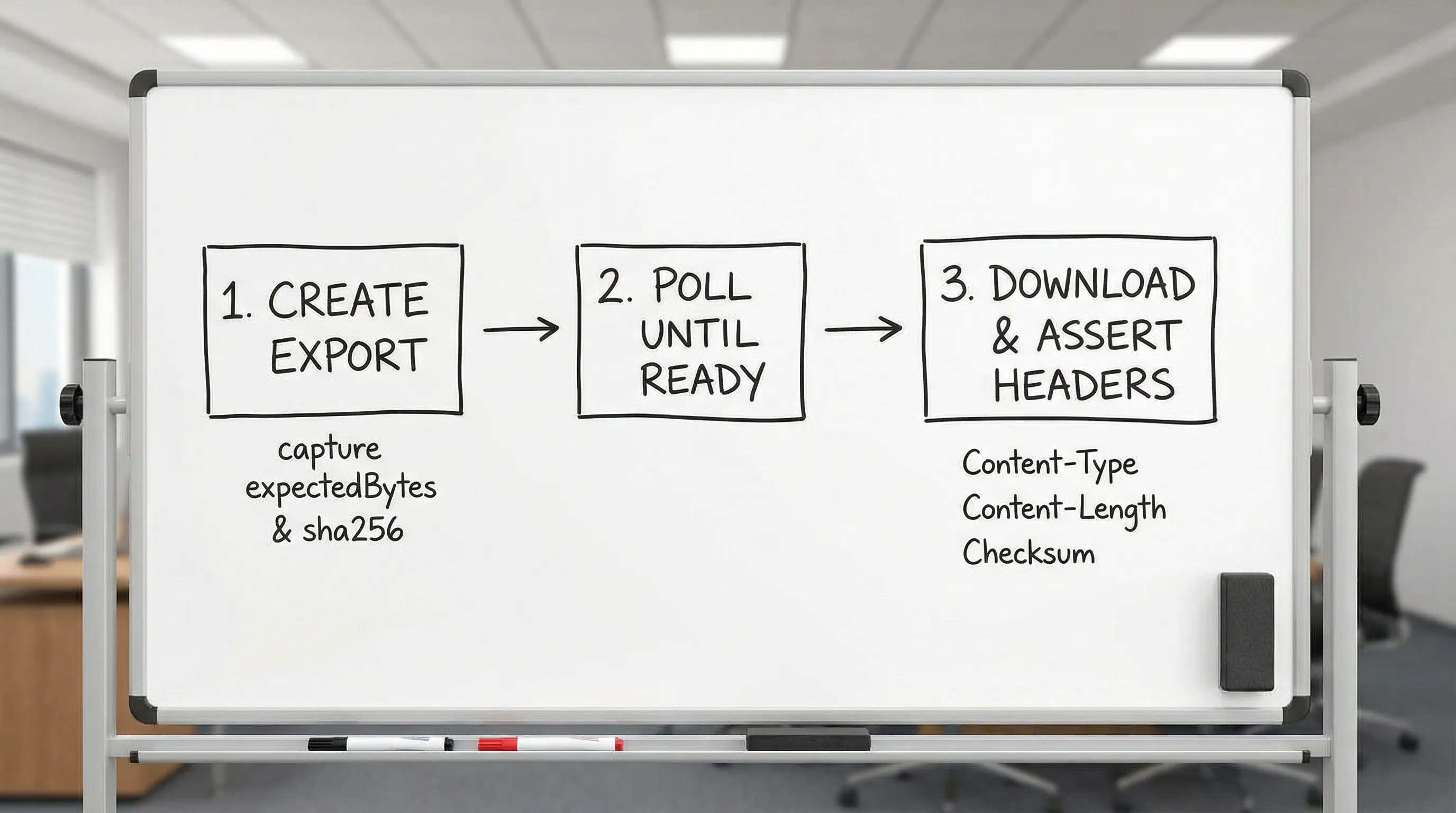
The most robust pattern is a two-step contract:
- Create or locate the artifact, and capture its expected
bytesandsha256(or a version token). - Download it, and assert headers match the captured expectations.
Below is an illustrative YAML flow structure showing request chaining. Adjust field names to your API and runner conventions, the important part is the pattern: capture expected values, then assert them.
env:
  BASE_URL: '{{BASE_URL}}'
  API_TOKEN: '{{API_TOKEN}}'

flows:
  - name: ExportReportAndDownload
    steps:
      - request:
          name: CreateExport
          method: POST
          url: '{{BASE_URL}}/v1/reports/exports'
          headers:
            Authorization: Bearer {{API_TOKEN}}
            Content-Type: application/json
          body:
            format: pdf
            reportId: 12345

      - js:
          name: ValidateExportCreated
          code: |
            export default function(ctx) {
              const resp = ctx.CreateExport?.response;
              if (resp?.status !== 202) throw new Error(`Expected 202, got ${resp?.status}`);
              if (!resp?.body?.exportId) throw new Error("exportId missing");
              return {
                exportId: resp.body.exportId,
                expectedBytes: resp.body.expectedBytes,
                expectedSha256: resp.body.sha256,
              };
            }
          depends_on: CreateExport

      - request:
          name: WaitUntilReady
          method: GET
          url: '{{BASE_URL}}/v1/reports/exports/{{CreateExport.response.body.exportId}}'
          headers:
            Authorization: Bearer {{API_TOKEN}}
          depends_on: ValidateExportCreated

      - js:
          name: ValidateReady
          code: |
            export default function(ctx) {
              const resp = ctx.WaitUntilReady?.response;
              if (resp?.status !== 200) throw new Error(`Expected 200, got ${resp?.status}`);
              if (resp?.body?.state !== "READY") throw new Error(`Not ready: ${resp?.body?.state}`);
              return { ready: true };
            }
          depends_on: WaitUntilReady

      - request:
          name: Download
          method: GET
          url: '{{BASE_URL}}/v1/reports/exports/{{CreateExport.response.body.exportId}}/download'
          headers:
            Accept: application/pdf
            Accept-Encoding: identity
            Authorization: Bearer {{API_TOKEN}}
          depends_on: ValidateReady

      - js:
          name: ValidateDownload
          code: |
            export default function(ctx) {
              const resp = ctx.Download?.response;
              if (resp?.status !== 200) throw new Error(`Expected 200, got ${resp?.status}`);
              const h = resp?.headers;
              if (h?.["content-type"] !== "application/pdf") throw new Error("Bad content-type");
              const expected = ctx.CreateExport?.response?.body;
              if (h?.["content-length"] !== String(expected?.expectedBytes)) {
                throw new Error("Content-Length mismatch");
              }
              if (h?.["x-content-sha256"] !== expected?.sha256) {
                throw new Error("Checksum mismatch");
              }
              if (h?.["cache-control"] !== "no-store") throw new Error("Bad cache-control");
              return { validated: true };
            }
          depends_on: Download
Notes:
- The
Accept-Encoding: identityrequest header is a practical trick when you want the byte representation to be consistent across environments. - The example validates a custom checksum header (
x-content-sha256) in thejs:node because it is unambiguous. If your API usesETagor another documented header, validate that instead. - Values from earlier steps are referenced directly via
{{CreateExport.response.body.exportId}}, so the data flow is obvious in diffs.
Header assertions that catch the most CI flakes
Content-Type and Content-Disposition
These two assertions prevent a surprising number of “download returned something else” regressions.
In particular, validate Content-Disposition when you expect a filename.
A pragmatic approach is:
- Assert it starts with
attachment;. - Assert it contains a stable prefix (for example,
filename="report-), not an exact full string if the filename includes timestamps.
If your runner supports regex or contains assertions, use them. If it only supports exact equality, move variability into a captured variable (for example, return filename from metadata, then compare).
Cache-Control and Vary
For user-specific exports, you usually want Cache-Control: no-store (or at least private, no-store). In CI, missing cache headers can show up as nondeterministic failures if intermediate layers cache aggressively.
Also look for:
Vary: Authorizationif responses vary by auth.Vary: Accept-Encodingif representation changes with compression.
Make the cache policy part of the test contract.
Accept-Ranges
If clients rely on resumable downloads, assert Accept-Ranges: bytes. It is a clean, deterministic header check, and it catches misconfigurations in object storage, proxies, and frameworks.
Chunked transfer and streaming downloads
When your endpoint is truly streaming:
- Do not require
Content-Length. - Make integrity come from a digest header or metadata call.
- Consider testing range reads explicitly if supported.
A practical range test looks like:
- Request with
Range: bytes=0-1023 - Assert
206 Partial Content - Assert
Content-Rangeis present and correctly formatted
That verifies the server and edge layers respect byte ranges, which is often critical for large files.
Keeping binary artifacts out of Git, without losing test value
If you need to validate that the file content matches a “golden” artifact, committing binaries to Git is usually a bad tradeoff. It bloats diffs and makes PR review painful.
Better options for experienced teams:
- Store golden artifacts in object storage and version them (your tests assert the version or checksum).
- Generate artifacts during the flow, and validate integrity via checksum, not by storing the bytes.
- Publish artifacts as CI build artifacts for debugging on failure, not as repo fixtures.
This approach pairs naturally with YAML-first workflows because the review surface stays small: changed headers, changed checksum, changed size.
Why YAML-first flows beat Postman/Newman and Bruno for download testing
You can test file downloads in Postman/Newman and Bruno, but it usually turns into imperative scripting:
- Postman/Newman: JS assertions in the Postman sandbox, plus collection format and environment JSON that is not optimized for review.
- Bruno: still script-heavy for non-JSON validation, with a tool-specific format.
For download endpoints, the contract is mostly headers and a few stable values. Declarative YAML assertions are a better fit because:
- Diffs stay readable in PRs (header changes show up line-by-line).
- Tests stay deterministic (less custom JS logic, fewer hidden dependencies).
- Request chaining is explicit (capture expected bytes or checksum, then assert them).
This is the core advantage of tools that run native YAML flows (like DevTools) over UI-locked formats: your download contract becomes normal code review, not a “trust the UI” exercise.
Practical tips for DevTools users
If you are generating flows from real browser traffic:
- Record a focused HAR that includes the export and download steps (see the guide on generating a HAR file in Chrome safely).
- Normalize volatile headers before committing (cookies, request IDs, timestamps).
- Convert implicit chaining into explicit captures (export ID, checksum, expected bytes).
If you are migrating an existing suite:
- Replace Postman scripts that “check the response is a PDF” with explicit header assertions.
- Move checksum expectations to a first-class captured value, rather than recomputing inside a sandbox.
The migration mechanics are covered in Migrate from Postman to DevTools, the download-specific contract is what you encode with the patterns above.
Frequently Asked Questions
Should I assert Content-Length for every file download? Only when the response is expected to have a known length. For streaming or chunked responses, assert integrity via a digest header or metadata instead.
Is ETag a checksum? Not necessarily. Some systems use a content hash, others use version identifiers or multipart-derived values. Only treat it as a checksum if your API documents that behavior.
How do I make checksum tests deterministic across environments? Compare the download response to a server-provided expected checksum (header or metadata). Also consider forcing Accept-Encoding: identity to avoid representation differences.
What is the simplest test that catches “HTML instead of a file”? Assert Content-Type exactly, and optionally assert Content-Disposition indicates attachment when you expect a download.
How do I avoid committing binaries while still validating content? Assert a stable checksum and byte length, and store the actual file as a CI artifact only on failure (or keep golden files in external storage with versioned hashes).
Run download contracts as code, locally and in CI
File downloads are one of those areas where UI-centric API tools tend to hide important details, and test suites rot into brittle scripts. A YAML-first approach keeps the contract reviewable: headers, sizes, and checksums in plain text, chained explicitly across steps.
If you want to codify these download checks in Git and execute them deterministically in CI, DevTools is designed for that workflow: record real traffic, convert it into readable YAML flows, and run them locally or in your pipeline. Start from https://dev.tools and keep your download behavior under code review, not trapped in a UI export format.
Download testing is often part of a larger end-to-end API testing workflow: authenticate, trigger the export, download the file, and verify the content. Chaining these steps into a single flow catches integration issues that isolated download tests miss.