
 Star on GitHub
Postman's 2026 Pricing Changes: What They Mean for Your API Testing Workflow
If your team is searching for Postman pricing 2026 details, you are probably not doing it out of curiosity. Pricing changes tend to surface a deeper workflow issue: API tests that were “cheap” only because they lived in a UI become expensive the moment collaboration, PR review, and CI enforcement are non-negotiable.
In March 2026, Postman’s pricing changed in a way that hits engineering teams directly: the Free plan is limited to one user. That single line item changes how you share collections, who can review test changes, and whether your CI pipeline is driven by source control or by a workspace.
This article breaks down what the March 2026 pricing change means for real API testing workflows (not just procurement), then gives a concrete migration path away from Postman/Newman toward DevTools, a free, open-source, YAML-first flow runner that keeps your API tests diffable in Git and deterministic in CI.
Postman’s March 2026 pricing: what changed
The key operational change is simple:
- Postman Free is now limited to 1 user.
For individuals, that might be fine. For teams, it is a structural constraint: anything requiring shared ownership, peer review, or multiple people authoring and running tests becomes awkward fast.
The plan pricing you will see associated with the 2026 update is:
- Free: limited to 1 user
- Basic: $14
- Professional: $29
- Enterprise: $49
Because vendors can adjust packaging, always cross-check the live pricing page before making a purchasing decision. The workflow impact, however, is stable: once Free is one-user-only, “just keep it in Postman” stops being a viable team strategy.
A practical view of the 2026 plan math
The moment you have more than one person touching API tests, you are in paid territory.
| Team size | Free (1 user) | Basic ($14) | Professional ($29) | Enterprise ($49) |
|---|---|---|---|---|
| 1 | $0 | $14 | $29 | $49 |
| 5 | Not workable for collaboration | $70 | $145 | $245 |
| 10 | Not workable for collaboration | $140 | $290 | $490 |
| 25 | Not workable for collaboration | $350 | $725 | $1,225 |
This is not a “Postman is evil” argument. It is a workflow argument: if your tests are critical infrastructure, they will be edited, reviewed, and executed by multiple people and multiple pipelines. Locking collaboration behind per-seat pricing forces teams to ask whether they want their API tests to be:
- UI-resident assets (hard to diff, hard to review), or
- Git-resident code (diffable, reviewable, reproducible)
If you already run regression tests in CI, the second option usually wins.
What the one-user Free limit means for real API testing workflows
Experienced teams typically care about three things:
- Change control: every test change should be reviewable in a pull request
- Determinism: the same commit should produce the same test behavior locally and in CI
- Auditability: when a regression is reported, you need to reproduce the run from the repo and artifacts
A one-user Free tier fights those goals in subtle ways.
1) Collaboration becomes “export and import” instead of PR review
If only one person can “own” the workspace, everyone else ends up:
- asking for exports of collections/environments,
- maintaining local copies that drift,
- pasting screenshots or raw JSON diffs into PRs,
- reviewing behavior instead of reviewing code.
That is not a process problem, it is an artifact problem. Postman collections are portable, but they are not a great native PR-review unit.
2) Test definitions live outside your normal software delivery system
If your API tests are merge gates, they should live next to the services they gate. Most engineering orgs standardize on:
- Git for change history
- PRs for review
- CI for execution
When tests live primarily in a UI, you get awkward questions:
- “Which workspace state produced this run?”
- “Did CI run the same collection version we reviewed?”
- “Who changed this request header, and why?”
You can work around this, but the workarounds become a permanent tax.
3) Newman in CI is a bridge, not a foundation
A common approach is “author in Postman, run in CI with Newman.” This worked when Postman was the authoring center of gravity.
In 2026 pricing, the problem is not just cost. It is that you are still coupling your test definitions to:
- Postman’s collection format,
- script-heavy assertions and pre-request logic,
- environment drift between UI and CI.
Newman can run collections, but it does not solve Git-native reviewability by itself.
4) You start paying for collaboration, even if you want local-first execution
Many teams do not want their API test definitions and traffic traces living in a cloud workspace by default.
If you care about:
- keeping sensitive payloads local,
- controlling what gets committed,
- avoiding accidental token leakage,
then a local-first workflow matters. Postman can be used carefully, but the incentives trend toward workspace-centric collaboration.
When evaluating alternatives, focus on artifacts and execution semantics
When teams say “we need a Postman alternative,” what they usually mean is:
- “We need portable test definitions.”
- “We need deterministic CI execution.”
- “We need request chaining without a pile of scripts.”
A useful evaluation checklist for experienced developers:
| Question | Why it matters |
|---|---|
| Is the test definition format diffable and reviewable? | PR review is your real quality gate. |
| Can the runner execute locally and in CI identically? | Reproducibility beats screenshots. |
| How is request chaining expressed? | Explicit captures reduce magic state. |
| How are secrets handled? | Env injection should be first-class. |
| Are assertions declarative? | Declarative checks tend to be less flaky. |
| Can we generate tests from real traffic? | Reality beats hand-authored mocks. |
This is where YAML-first tools have an advantage: YAML is not “fancy,” it is boring on purpose, and boring is good for CI.
Why DevTools fits teams pushed out of Postman Free
DevTools (https://dev.tools) is a free, open-source, YAML-first API testing and flow runner designed around Git workflows.
Key properties that matter in 2026 pricing conversations:
- Native YAML flows: human-readable, diffable, reviewable in pull requests
- HAR to YAML conversion: record real browser traffic, convert to executable flows with auto-mapped variables
- Local-first execution: run tests locally, keep data on your machine by default
- CI-friendly runner: built to run in pipelines, produce machine-readable outputs
Most importantly, DevTools is opinionated about the artifact: your source of truth is a YAML file in Git, not a workspace.
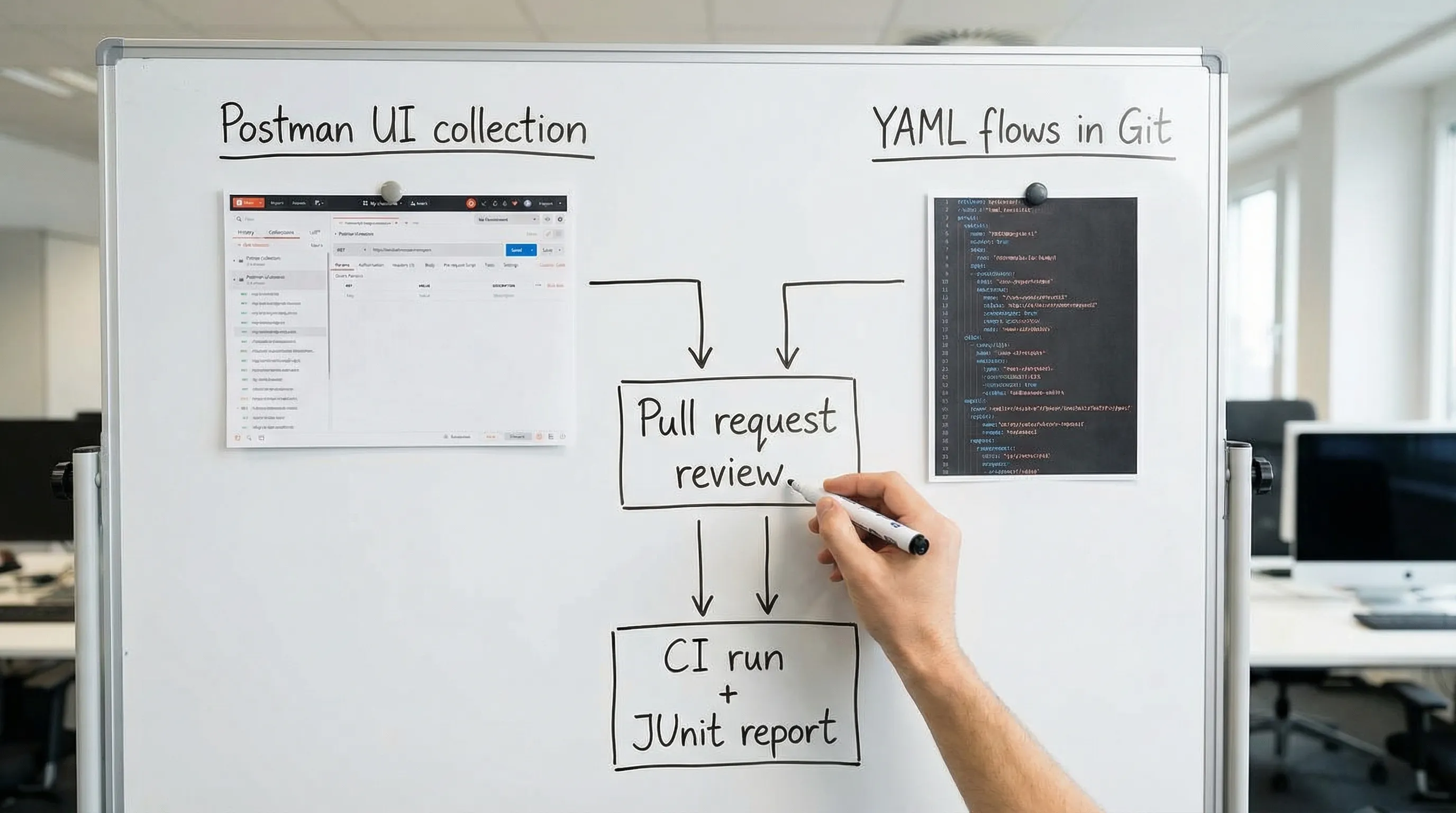
A concrete example: request chaining in YAML (no UI state)
Here is the sort of thing teams typically do in Postman with a mix of environment variables and scripts: login, capture a token, call an endpoint, validate shape.
In a YAML-first flow, you want two things:
- captures are explicit,
- assertions are deterministic.
Example YAML (illustrative structure):
workspace_name: Auth Smoke
env:
  BASE_URL: '{{#env:BASE_URL}}'
  TEST_USER_EMAIL: '{{#env:TEST_USER_EMAIL}}'
  TEST_USER_PASSWORD: '{{#env:TEST_USER_PASSWORD}}'
run:
  - flow: AuthSmoke
flows:
  - name: AuthSmoke
    steps:
      - request:
          name: Login
          method: POST
          url: '{{BASE_URL}}/v1/login'
          headers:
            Content-Type: application/json
          body:
            email: '{{TEST_USER_EMAIL}}'
            password: '{{TEST_USER_PASSWORD}}'
      - js:
          name: ValidateLogin
          code: |
            export default function(ctx) {
              if (ctx.Login?.response?.status !== 200) throw new Error("Login failed");
              if (!ctx.Login?.response?.body?.access_token) throw new Error("No access_token");
            }
          depends_on: Login
      - request:
          name: GetProfile
          method: GET
          url: '{{BASE_URL}}/v1/me'
          headers:
            Authorization: 'Bearer {{Login.response.body.access_token}}'
          depends_on: Login
      - js:
          name: ValidateProfile
          code: |
            export default function(ctx) {
              if (ctx.GetProfile?.response?.status !== 200) throw new Error("GetProfile failed");
              if (typeof ctx.GetProfile?.response?.body?.id !== "string") throw new Error("Missing id");
              if (ctx.GetProfile?.response?.body?.email !== ctx.env?.TEST_USER_EMAIL) throw new Error("Email mismatch");
            }
          depends_on: GetProfile
Two workflow differences vs Postman are worth calling out:
- The flow is reviewable as text. A token capture shows up as a diff.
- The dependency is local to the file. You do not need “remembered” workspace variables to understand the chain.
If you have ever debugged a CI failure caused by an implicit environment variable, you already understand why this matters.
Postman vs Newman vs Bruno vs DevTools (workflow comparison)
Tools are rarely “better” in general, they are better for a specific operating model.
Here is a workflow-oriented comparison for teams optimizing for Git and CI.
| Tool | Primary authoring model | Storage format | CI posture | Where it tends to break down |
|---|---|---|---|---|
| Postman | UI-first | Collection JSON + workspace state | Possible, but often indirect | PR review friction, drift between UI and repo |
| Newman | Runner for Postman collections | Collection JSON | Good for running what you already have | Still inherits collection + script complexity |
| Bruno | Local client | File-based, but its own format/schema | Can be CI-driven | Format portability and team conventions vary |
| DevTools | YAML-first, Git-first | Native YAML flows | Designed for CI execution | Requires you to commit to YAML as source of truth |
The key differentiator relevant to 2026 pricing is not “has features,” it is: does the tool treat Git as the system of record.
Migration guide: Postman (and Newman) to DevTools with minimal drama
This section is the concrete path. The goal is not to perfectly translate every script. The goal is to migrate your regression signal into:
- YAML flows that are reviewable in PRs
- deterministic request chaining
- CI execution with clear reports
If you want a reference migration doc, DevTools maintains a dedicated guide you can use alongside this article: Migrate from Postman to DevTools.
Phase 0: Decide what you are migrating
Before you export anything, separate assets into two buckets.
Bucket A: should migrate directly
- request definitions (method, URL, headers, bodies)
- environments (base URLs, common variables)
- basic assertions (status codes, presence checks)
- request chaining (IDs, tokens, locations)
Bucket B: should be rebuilt or simplified
- script-heavy test logic (complex JS in tests/pre-request)
- flows that depend on UI state or manual steps
- “god collections” that mix smoke, regression, and load in one place
Most teams are surprised how much value lives in Bucket A.
Phase 1: Inventory your Postman footprint (fast but explicit)
Create a short inventory file in your repo (or internal doc) with:
- which collections are used as CI gates
- which environments exist (staging, preview, prod)
- where secrets come from today
- which flows require chaining (create then fetch, login then call)
The point is to avoid migrating artifacts you do not run.
A simple table is enough:
| Collection | Purpose | Runs in CI? | Needs auth? | Notes |
|---|---|---|---|---|
| auth-smoke | PR gate | Yes | Yes | token capture |
| orders-regression | nightly | Yes | Yes | create then cancel |
| admin-manual | manual only | No | Yes | keep in Postman for now |
Phase 2: Pick your source: Postman export vs HAR capture
You have two practical ways to get to YAML flows.
Option A: Export Postman collections
This is best when:
- requests are already clean and parameterized,
- you rely mostly on variables and simple tests,
- UI traffic is not the source of truth.
The export gives you structured request definitions. From there, you map:
- environments to env files or CI env vars
- tests to YAML assertions
- scripts to explicit steps
Option B: Record real traffic as HAR, then convert to YAML
This is best when:
- the “real workflow” lives in a browser app,
- Postman collections are incomplete or stale,
- you want to capture the exact call sequence and headers.
DevTools supports converting browser traffic to flows. If you need the mechanics, see: Generate a HAR file in Chrome (Safely).
A practical tip: HAR-based generation is extremely effective for request chaining because the traffic naturally encodes dependencies.
Phase 3: Set up a Git-friendly repo layout
Avoid inventing structure later. Put test code where CI expects it.
A common layout for YAML flows looks like:
flows/for YAML flowsenv/for non-secret environment templatesfixtures/for static payloads- CI workflow under
.github/workflows/
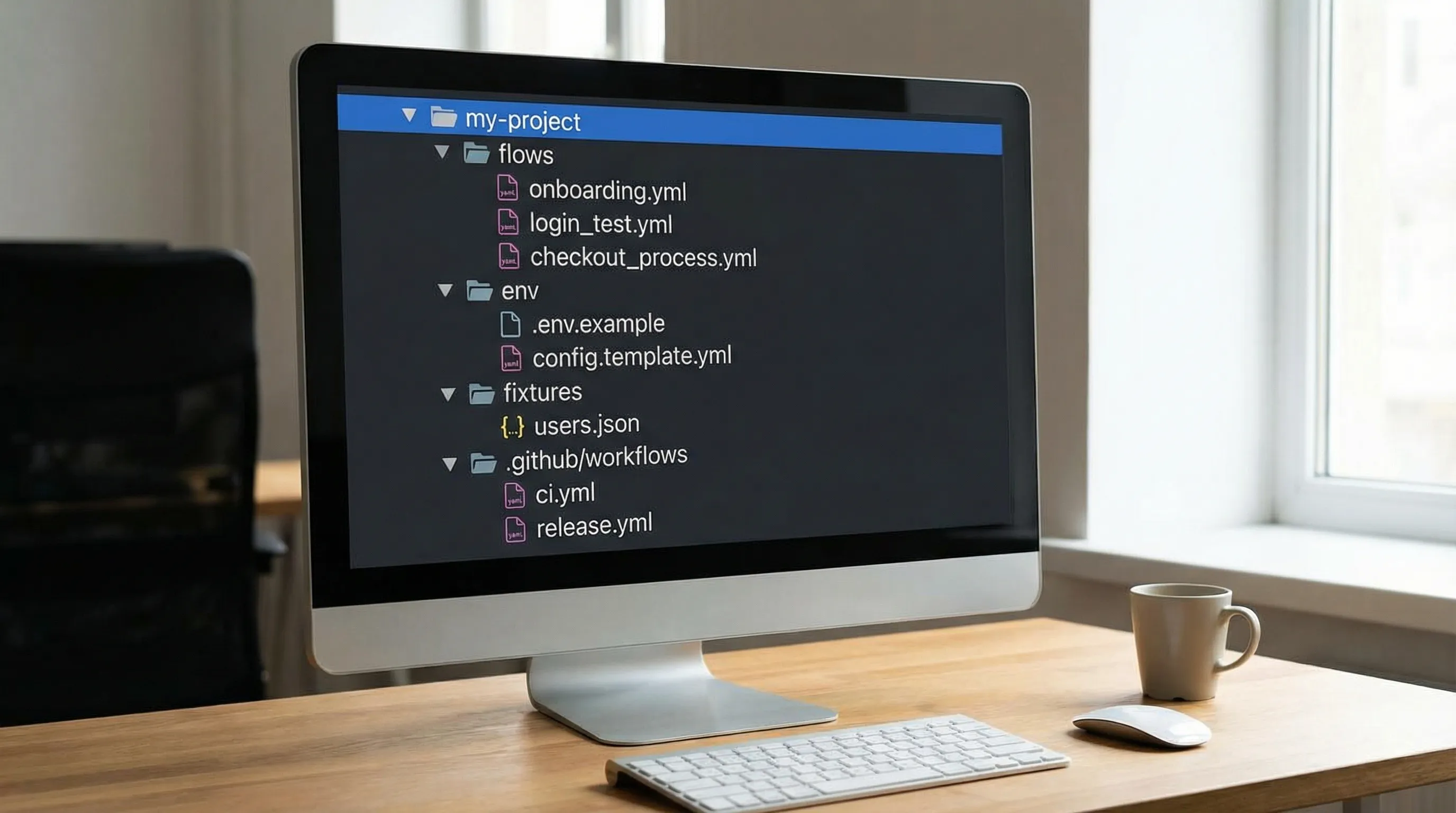
If your team cares about clean diffs, adopt formatting conventions early. DevTools has guidance on stable YAML diffs here: YAML API Test File Structure: Conventions for Readable Git Diffs.
Phase 4: Translate environments and secrets (do not commit secrets)
Postman environments often combine:
- non-secret config (base URL), and
- secrets (API keys, passwords)
For Git-first workflows:
- commit non-secret templates,
- inject secrets at runtime.
Example env/staging.env template (committed, no secrets):
BASE_URL: "https://staging.api.example.com"
TIMEOUT_MS: "15000"
Then inject secrets via CI variables (GitHub Actions secrets, GitLab CI variables, Vault, OIDC, etc.).
If you are migrating from Newman, this is one of the most meaningful improvements: secrets stop living inside a UI environment export.
Phase 5: Convert request chaining into explicit captures
Postman chaining often looks like:
- run request A
- in Tests tab, set
pm.environment.set("id", ...) - request B uses
{{id}}
In YAML flows, keep captures adjacent to usage.
A common pattern is create then fetch, capturing Location or an ID:
workspace_name: Create Then Fetch
env:
  BASE_URL: '{{#env:BASE_URL}}'
  TOKEN: '{{#env:TOKEN}}'
run:
  - flow: CreateThenFetch
flows:
  - name: CreateThenFetch
    steps:
      - request:
          name: CreateOrder
          method: POST
          url: '{{BASE_URL}}/v1/orders'
          headers:
            Authorization: 'Bearer {{TOKEN}}'
            Content-Type: application/json
          body:
            sku: 'TEST-SKU-1'
            qty: 1
      - js:
          name: ValidateCreate
          code: |
            export default function(ctx) {
              if (ctx.CreateOrder?.response?.status !== 201) throw new Error("Create failed");
              if (typeof ctx.CreateOrder?.response?.body?.id !== "string") throw new Error("Missing order id");
            }
          depends_on: CreateOrder
      - request:
          name: FetchOrder
          method: GET
          url: '{{BASE_URL}}/v1/orders/{{CreateOrder.response.body.id}}'
          headers:
            Authorization: 'Bearer {{TOKEN}}'
          depends_on: CreateOrder
      - js:
          name: ValidateFetch
          code: |
            export default function(ctx) {
              if (ctx.FetchOrder?.response?.status !== 200) throw new Error("Fetch failed");
              if (ctx.FetchOrder?.response?.body?.id !== ctx.CreateOrder?.response?.body?.id) throw new Error("Order ID mismatch");
            }
          depends_on: FetchOrder
This is where YAML shines in PRs: a reviewer can see exactly which value is captured, from where, and how it is used.
If your team struggles with flaky assertions, it is worth standardizing a small set of patterns. The DevTools post JSON Assertion Patterns for API Tests is a good reference.
Phase 6: Replace Postman scripts with deterministic YAML assertions
Postman’s scripting model is powerful, but it tends to drift into “mini programs” that are hard to review and harder to keep deterministic.
A pragmatic migration strategy:
- start by migrating status and shape assertions,
- only rebuild complex logic when it provides real regression signal.
What to migrate first:
- status code checks
- header invariants (content-type)
- presence/type checks for key fields
- subset matching for stable objects
What to avoid early:
- snapshotting entire responses without normalization
- brittle ordering checks on arrays unless you sort/normalize
- time-dependent assertions unless you use tolerances
If you want a CI-first philosophy for reducing flakes, see: Deterministic API Assertions: Stop Flaky JSON Tests in CI.
Phase 7: Make “run locally” identical to “run in CI”
The goal is a single execution model:
- same flows
- same env templates
- same secret injection model
- same runner version pinned in CI
This is where teams often realize a hidden cost of Postman plus Newman: local runs and CI runs differ more than they should.
If you pin tool versions in CI (you should), include the test runner too. Here is a useful general CI practice article: Pinning GitHub Actions + Tool Versions.
Phase 8: Wire DevTools into CI with reporting you can act on
The migration is not complete when the YAML exists. It is complete when:
- PRs run smoke flows
- main branch runs regression flows
- failures produce artifacts (logs, JUnit)
DevTools provides CI-oriented guidance, including GitHub Actions examples. Start here: API regression testing in GitHub Actions.
A CI tip that tends to matter more than the tool itself: produce JUnit so PR checks display failures cleanly, then upload detailed logs as artifacts. If you do that, you reduce the “rerun it locally and guess” loop.
Phase 9: Review and governance: make YAML flows first-class code
Once tests are in Git, treat them like code:
- require PR review for flow changes
- add CODEOWNERS for critical suites
- run formatting checks (stable YAML diffs)
- keep smoke vs regression separate
DevTools has a strong perspective on using PRs as the workflow center. If your org uses GitHub Flow, this is a good alignment read: GitHub Flow Explained for API Testing Teams.
A migration checklist you can actually follow
Use this as a cutover checklist for a single service or suite.
| Step | Outcome | “Done” signal |
|---|---|---|
| Inventory collections | Know what matters | List of suites that gate CI |
| Decide export vs HAR | Choose source of truth | One chosen per suite |
| Create repo layout | Predictable paths | flows/ and env templates committed |
| Parameterize secrets | No secrets in Git | CI injects secrets |
| Implement chaining | Explicit dependencies | Captures adjacent to usage |
| Add assertions | Deterministic checks | No timestamp flake, minimal snapshots |
| Local run parity | Same as CI | Same env injection model |
| CI wiring | Visible failures | JUnit + logs artifacts |
| Decommission Postman gate | No dual maintenance | CI gates on YAML flows |
If you are migrating from Newman specifically, DevTools also positions its CLI as a CI-native alternative: Newman alternative for CI: DevTools CLI.
Cost is not just licensing, it is coordination
Seat-based pricing is easy to compute. The harder cost is coordination time:
- time spent exporting/importing collections
- time spent reverse-engineering a failing run
- time spent reviewing opaque diffs (or no diffs)
- time spent fixing flaky tests caused by implicit state
If your team wants to quantify tooling spend and reduce waste across subscriptions, tracking it like any other recurring cost helps. The folks at FIYR write good, practical content on organizing and understanding spending, which can be useful when you are trying to justify engineering tooling choices internally. A good starting point is the FIYR blog.
Where Bruno fits, and why YAML still matters
Bruno is popular with developers who want local files, not a cloud workspace. That direction is valid.
The practical question for teams is: what is the long-term “shared artifact”?
- If your org standardizes on YAML for infra and automation, keeping API tests in YAML reduces cognitive overhead.
- If you want PR review with minimal tooling dependencies, YAML tends to be readable by default.
The important point is not to chase a “Postman clone.” It is to pick an artifact that fits how your org already ships software.
Frequently Asked Questions
Is Postman Free really limited to one user in 2026? Postman’s March 2026 change, as commonly reported in pricing discussions, is that the Free plan is limited to 1 user. Verify the current plan page for the latest packaging.
Do I need to rewrite all Postman scripts to migrate? No. Migrate the regression signal first (status, invariants, request chaining). Script-heavy logic is usually a smaller subset than it looks, and often worth simplifying.
Can DevTools replace Newman in CI? Yes, the typical approach is to replace “collection execution” with running YAML flows in CI, producing machine-readable results. See the DevTools CI guide for the exact integration details.
How do you handle secrets with YAML flows? Keep non-secret env templates in Git and inject secrets via CI secrets or your secret manager at runtime. Do not commit HAR files or environment exports with tokens.
What is the fastest way to generate flows that match real production behavior? Record a focused HAR from a staging environment, redact appropriately, then convert to YAML and make chaining explicit. This tends to capture the real call sequence more accurately than manually maintained collections.
Will YAML flows be readable in pull requests for large suites? Yes, if you enforce conventions: stable step IDs, consistent ordering, and minimal noisy diffs. Treat formatting rules as part of the harness.
Migrate off Postman pricing pressure, and make your tests Git-native
Postman’s 2026 Free plan limit (1 user) forces a decision: pay for collaboration inside a UI, or move the source of truth into Git where your engineering workflow already lives.
If you want API tests that are:
- native YAML, not a custom DSL and not UI-locked
- reviewable in pull requests
- runnable locally and in CI with deterministic chaining
- generated from real browser traffic when needed
then DevTools is built for that operating model.
Get started at dev.tools, and when you are ready to migrate a real suite, follow the dedicated guide: Migrate from Postman to DevTools.