
 Star on GitHub
Pinning GitHub Actions + Tool Versions: Stop CI Breakage (DevTools Included)
CI breakage is often self-inflicted: a job that was green yesterday silently pulled a different Action commit, a newer runner image, a new Node runtime, or a new CLI binary. The fix is not “rerun the pipeline”. The fix is pinning.
Pinning is boring, and that is the point. It turns your CI from “best effort” into something you can reason about: inputs are explicit, diffs are reviewable, and regressions are attributable.
This matters even more for Git-based API testing, where you want the API workflow (YAML) to be stable and diffable, and the runner that executes it to be stable too.
What you should pin (and why CI breaks when you do not)
In a GitHub Actions workflow, there are multiple moving parts that can change without a PR:
- Actions referenced as
@v4or@maincan change behavior. - Runner images (
ubuntu-latest) are updated on GitHub’s schedule. - Language toolchains (Node, Go, Python, Java) change when setup actions resolve a new default.
- CLIs installed from “latest” GitHub releases, Homebrew, npm, or curl scripts drift.
- Container images referenced as
:latestdrift.
If any of these move, your YAML API tests might be perfectly fine, but the harness around them changed.
The goal is simple: when CI breaks, you want the diff to show exactly what changed.
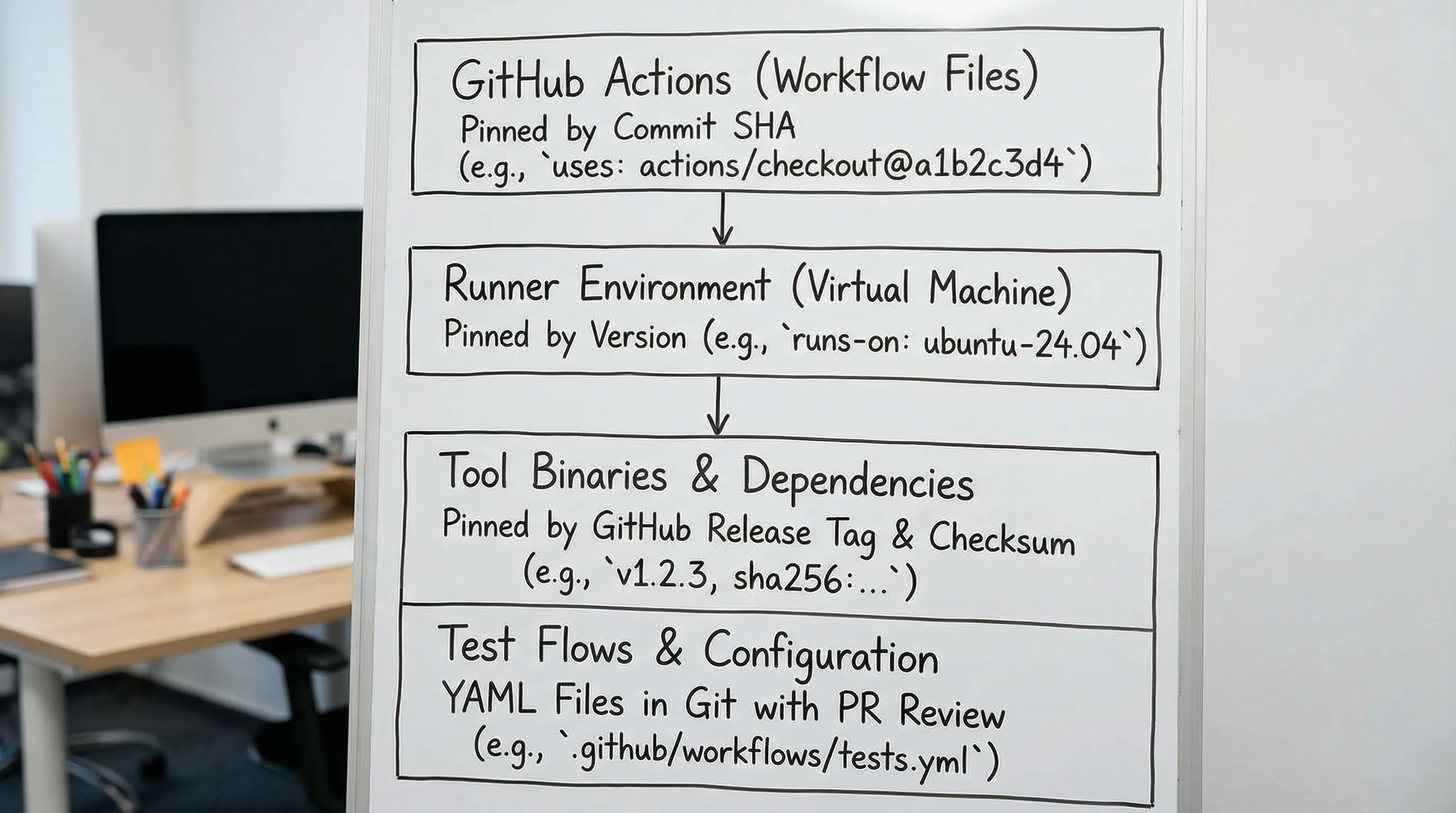
Pin Actions by commit SHA (not by tag)
Tags like actions/checkout@v4 are convenient, but they are still a moving pointer. Best practice for deterministic and secure pipelines is to pin to a full commit SHA.
GitHub explicitly calls out pinning third-party Actions as a supply-chain hardening measure. See GitHub’s security hardening guidance for Actions.
Here is the practical pattern:
name: ci

on:
  pull_request:
  push:
    branches: [ main ]

jobs:
  test:
    runs-on: ubuntu-24.04
    steps:
      - name: Checkout
        uses: actions/checkout@b4ffde65f46336ab88eb53be808477a3936bae11 # v4.2.1

      - name: Setup Go
        uses: actions/setup-go@0a12ed9d6a4a3f8a3b1c1d60b0a34b7c606b53c3 # v5.0.2
        with:
          go-version-file: go.mod

      - name: Print toolchain
        run: |
          go version
Notes that matter in real repos:
- Keep the human-readable tag comment (example:
# v4.2.1). It makes review sane. - Update SHAs via automation (Dependabot or Renovate), not manually.
- Avoid
@mainentirely unless you are deliberately tracking upstream head.
Pin the runner image (stop using ubuntu-latest)
ubuntu-latest is designed to move. It will roll from 22.04 to 24.04 (and beyond) on GitHub’s timeline, and the change comes with new preinstalled packages and removals.
If you want deterministic CI:
- Use
ubuntu-24.04(orubuntu-22.04), notubuntu-latest. - If you need even more control, run your job in a container image you own and version.
Example:
jobs:
  test:
    runs-on: ubuntu-24.04
If you run API regression tests that touch TLS, compression, timeouts, or crypto stacks, runner drift is not theoretical. Small dependency changes can change behavior.
Pin language runtimes and package managers
A large percentage of “random CI failures” are actually “you got a different runtime.” If you install tools from npm (Newman, Bruno’s CLI, etc.), you must pin Node and the package versions.
Example with Node pinned and npm package pinned:
- name: Setup Node
  uses: actions/setup-node@60edb5dd545a775178f52524783378180af0d1f8 # v4.0.4
  with:
    node-version: '20.11.1'

- name: Install Newman (pinned)
  run: npm i -g newman@6.1.0

- name: Print versions
  run: |
    node --version
    npm --version
    newman --version
This is where Postman/Newman setups often go wrong:
- A collection may be stable, but the execution environment is not.
- Newman is “just npm”, which is great, but it inherits the full Node ecosystem’s drift unless you pin aggressively.
If you are migrating away from UI-locked formats and towards “tests as code”, pinning the runtime is part of taking CI seriously.
Pin CLI tools from GitHub releases (DevTools included)
If your CI downloads a CLI from GitHub releases, treat that binary as a dependency like any other:
- Pin to a specific version tag.
- Verify checksums if the project publishes them.
- Print
--versionin CI so logs prove what ran.
This is exactly where teams get cut by “curl | bash” installers that always fetch “latest”. They are convenient locally, but they are not deterministic in CI.
A deterministic install pattern (release tag + checksum)
Below is the pattern, independent of the tool. Use it for DevTools CLI, Postman CLI, bespoke internal CLIs, etc.
env:
  TOOL_VERSION: '0.1.6'

steps:
  - name: Download CLI (pinned)
    run: |
      set -euo pipefail
      # Example placeholders. Use your tool's actual release asset URLs and checksums.
      echo "Downloading version: ${TOOL_VERSION}"

  - name: Verify and print version
    run: |
      set -euo pipefail
      ./tool --version
For DevTools, the key idea is the same: install the DevTools runner at a pinned version, then execute the committed YAML flows. The flows are already Git-native and reviewable, but you still want the runner version to be stable.
If you want a ready-made workflow that runs DevTools YAML flows in GitHub Actions (with artifacts and reports), use the existing guide and then apply the pinning rules in this article to the Actions and installs: API regression testing in GitHub Actions.
Why pinning matters more for YAML-first tools
YAML-first testing (DevTools) is designed for diffs and PR review. But if the runner changes underneath you, you can still get:
- Different default timeouts or retry behavior
- Different parsing or serialization edge cases
- Slightly different variable extraction behavior
Pinning the runner version keeps the execution semantics stable so PR diffs correlate with behavior changes.
Pin container images and service dependencies
If your workflow uses services (Postgres, Redis, Kafka, localstack) and you reference :latest, you are choosing drift.
Pin image tags:
services:
  postgres:
    image: postgres:16.1
    env:
      POSTGRES_PASSWORD: postgres
    ports:
      - 5432:5432
For API tests, service drift can show up as timing changes, new defaults, stricter auth, or changed response formats.
Decide what “pinned” means in your repo
“Pinned” is not binary. There are levels. This table is a useful policy starting point.
| Component | Bad (drifts) | Better | Best (deterministic) |
|---|---|---|---|
| Actions | uses: org/action@main | @v4 | @<full commit SHA> |
| Runner | ubuntu-latest | ubuntu-24.04 | Pinned runner + pinned container image |
| Docker images | myimg:latest | myimg:1.2 | myimg@sha256:<digest> |
| npm tools | npm i -g tool | tool@6 | tool@6.1.0 + pinned Node |
| GitHub releases | “download latest” | pinned tag | pinned tag + checksum verification |
If you are running API flows in CI (DevTools, Newman, Bruno), you should aim for “Best” across the board.
Keep pins updated without reintroducing drift
Pinning prevents surprise breakage, but it introduces a new job: controlled updates.
The correct workflow is “pins move via PR”:
- Dependabot (native) can update Action SHAs and tags.
- Renovate can manage more ecosystems and patterns.
- A scheduled “dependency bump” PR can update pinned tool versions.
The important part is not which bot you use. It is that updates:
- are reviewable
- run on pull request CI
- land via merge, not by surprise
If you need a quick reminder of how GitHub fits in a DevOps workflow (repos, PRs, CI, collaboration), this GitHub development platform overview is a concise reference you can send to non-specialists on your team.
Practical scenario: request chaining and pinning failures
YAML-based API flows often use request chaining: capture a value from one response (token, ID, ETag) and use it in the next request. That is the correct way to keep tests deterministic and avoid hardcoded state.
But when CI breaks, the symptom is often misleading:
- “401 Unauthorized” looks like an auth issue.
- “JSON path not found” looks like an API response change.
In practice, a drifting runner can also cause failures around:
- TLS / CA bundles
- HTTP/2 defaults
- decompression behavior
- timeouts
Pinning narrows the blame surface:
- If the API changed, your pinned harness stays constant and the test failure is legitimate.
- If the harness changed, the PR that changed the pin is the only suspect.
That is why pinning is not busywork. It is how you keep request chaining reliable.
Comparing pinning stories: Postman/Newman vs Bruno vs DevTools
These tools differ less in “can I run an HTTP request” and more in how cleanly they fit into Git-centric workflows.
Postman + Newman
- Collections and environments are not native YAML. You can store them in Git, but diffs tend to be noisy.
- Newman typically runs via npm, so you must pin:
- Node version
- Newman version
- any Newman reporters you use
If you do not, you get “it worked last week” failures when Node, npm, or Newman changes.
Bruno
- Bruno is Git-friendly compared to Postman, but you still need to pin the CLI runtime and version in CI.
- If you install via npm, the same Node pinning rules apply.
DevTools
- DevTools flows are native YAML, designed to be readable and reviewable in PRs.
- The remaining source of nondeterminism is usually the CI harness:
- Action SHAs
- runner image
- the DevTools runner version
That is why “DevTools included” in this topic matters: YAML-first tests remove UI-locked drift, but you still need version discipline in CI.
A minimal pinned workflow skeleton you can adapt
This is a CI skeleton that demonstrates pinning without prescribing your exact test commands:
name: api-tests

on:
  pull_request:

jobs:
  api:
    runs-on: ubuntu-24.04
    timeout-minutes: 15

    steps:
      - name: Checkout
        uses: actions/checkout@b4ffde65f46336ab88eb53be808477a3936bae11 # v4.2.1

      - name: Setup Node
        uses: actions/setup-node@60edb5dd545a775178f52524783378180af0d1f8 # v4.0.4
        with:
          node-version: '20.11.1'

      - name: Cache
        uses: actions/cache@0c45773b623bea8c8e55f6efb8397074f8b51102 # v4.0.2
        with:
          path: |
            ~/.cache
          key: ${{ runner.os }}-cache-${{ hashFiles('**/go.sum', '**/package-lock.json') }}

      - name: Print versions
        run: |
          node --version
          npm --version

      - name: Run API flows
        env:
          BASE_URL: ${{ secrets.BASE_URL }}
          API_TOKEN: ${{ secrets.API_TOKEN }}
        run: |
          set -euo pipefail
          # Replace with your pinned runner and command.
          # For DevTools, see https://dev.tools/guides/api-regression-testing-github-actions/
          echo "Run tests here"
The caching example is intentionally generic. The key point is that the workflow itself is pinned and reviewable.
Operational checks that catch drift early
Two simple practices prevent hours of debugging:
- Always print versions for anything that can drift (
--versionin CI logs). - Fail fast on unpinned references via a lightweight linter.
You can enforce policy with a script that rejects:
uses: .*@mainubuntu-latest:latestcontainer tags
This belongs in CI because pinning is not a one-time migration. It is an invariant.
Where “github releases” fit in a sane CI strategy
GitHub releases are a great distribution mechanism for developer tools, but only if you treat them like immutable artifacts:
- CI should reference a specific release tag (or asset digest), not “latest”.
- Your repo should make the chosen version explicit (env var,
.tool-versions, or a smallversions.env). - Updating a tool version should be a normal PR with a clear diff and passing tests.
For DevTools specifically, pairing “YAML flows in Git” with “pinned runner from GitHub releases” gets you as close as possible to reproducible API regression tests.
The takeaway: make CI changes boring
Pin Actions. Pin runners. Pin languages. Pin CLIs. Pin images. Print versions.
Once everything is pinned, breakage becomes actionable: either the API changed, or you intentionally bumped a dependency and can revert or fix forward. That is the difference between “CI roulette” and a test pipeline you can trust.