
 Star on GitHub
HAR → YAML API Test Flow: Auto-Extract Variables + Chain Requests
If you can reproduce a user workflow in the browser, you can usually capture the underlying HTTP traffic. The hard part is turning that capture into a deterministic, reviewable API test that survives refactors, runs in CI, and does not embed secrets. In effect, you are building an end-to-end API test: a chained sequence of real requests where each step's output feeds the next.
A good HAR → YAML pipeline does two things well:
- Auto-map variables (tokens, IDs, CSRF values, cursors) so the flow is runnable, not just a static replay. These become
{{NodeName.response.body.field}}references. - Chain requests explicitly with
depends_onso every dependency is visible in Git diffs and PR review.
DevTools is built around that model: import real browser traffic (HAR), generate a Git-friendly YAML flow, then run it locally or in CI.
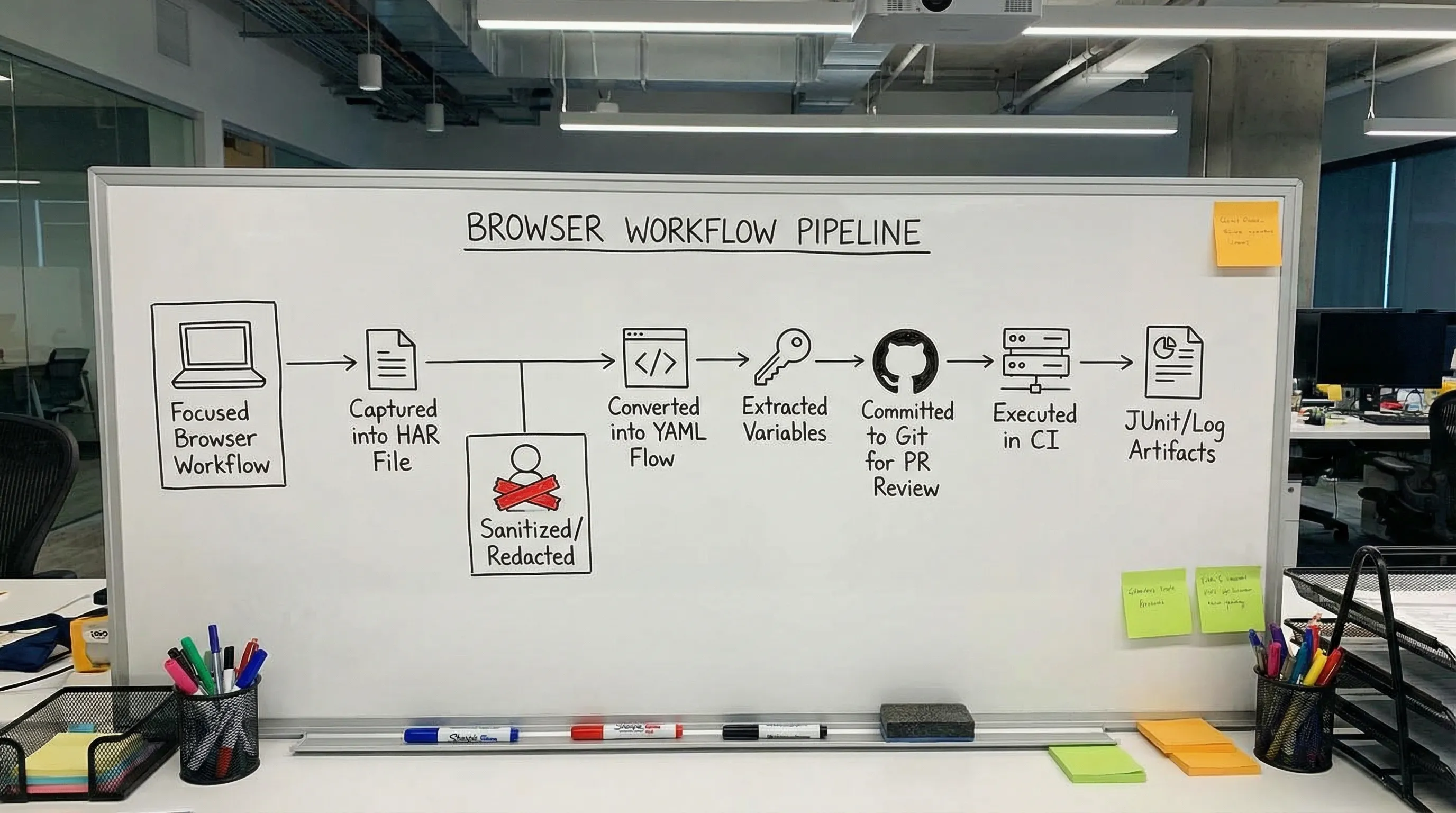
What a HAR capture gives you (and what it breaks)
A HAR is effectively a timeline of HTTP requests and responses emitted by your browser (URLs, headers, cookies, payloads, response bodies, timing). It is excellent for ground-truthing what actually happened during a UI-driven workflow.
But a raw HAR is usually not a runnable test as-is:
- It contains secrets (Authorization headers, cookies, session identifiers).
- It contains one-off values (timestamps, request IDs, anti-bot values).
- It bakes in implicit state (cookie jar, redirects, cached resources).
- It often includes noise you do not want in regression (analytics, long-polling, third-party domains).
So the goal is not “replay the HAR forever”. The goal is “use HAR as an input to generate a clean API flow you can own in Git”.
If you need a refresher on collecting a safe, minimal capture, DevTools has a practical guide: Generate a HAR file in Chrome (Safely).
The workflow: HAR → YAML flow you can review
A robust conversion pipeline for experienced teams typically looks like this:
- Record a narrow HAR for one business path (login → create resource → fetch resource, etc.).
- Filter and redact aggressively (keep raw HAR local, do not commit it).
- Convert to YAML so requests become readable, diffable steps.
- Review the auto-extracted variables and make the dependencies explicit.
- Commit the YAML flow and run it locally and in CI.
DevTools specifically aims to make steps 3 and 4 fast: it can generate an “auto flow” from your HAR and auto-map variables so repeated dynamic values become captures and references.
For teams that need strict hygiene around captured traffic, see: How to Redact HAR Files Safely (Keep Tests Shareable, Remove Secrets).
Auto-extract variables: what you actually want mapped
Auto-extraction is valuable when it reduces manual wiring without hiding the logic. In practice, the high ROI variables fall into a few buckets.
Variable types worth extracting (and the usual source)
| Variable type | Typical capture point | Where it gets reused | Common pitfall |
|---|---|---|---|
| Bearer access token | JSON body from auth response | Authorization header on subsequent API calls | Capturing refresh tokens unintentionally, or capturing an expired token from a pre-auth request |
| CSRF token | Response header or HTML/JSON body | Header or form field on mutations | Token rotates per session, so you must chain it, not hardcode it |
| Session cookie | Set-Cookie response header | Automatically via cookie jar or explicit Cookie header | Committing cookies to Git (do not) |
| Resource ID | JSON response body or Location header | Path parameter of follow-up calls | IDs are sometimes nested or appear in multiple formats (UUID vs short ID) |
| Pagination cursor | JSON body | Query param for next-page calls | Cursor depends on sort/filter, so keep those deterministic |
| ETag / version | Response header | If-Match / optimistic concurrency header | Weak vs strong ETag semantics differ across servers |
The key is: prefer referencing the node output closest to the source of truth (e.g., {{CreateWidget.response.body.id}}), not from a later request where the value merely appeared.
What you generally should not auto-extract
Some values appear everywhere in a HAR but are poison for deterministic tests:
- Timestamps (
Date,ts,createdAt) and rolling windows - Random request IDs (
x-request-id,traceparent) that you do not control - A/B experiment headers or analytics query params
- CDN cache busters
Instead of extracting these, you typically delete them from the generated flow (or assert on shape, not equality).
If you want patterns for assertions that avoid flakiness, this pairs well with: Deterministic API Assertions: Stop Flaky JSON Tests in CI.
Request chaining in YAML: make dependencies obvious
Once you have a generated YAML flow, the most important work is making each dependency explicit and reviewable. This is where YAML-first shines: reviewers can see what changed without opening a UI or diffing a giant collection export.
Below are examples showing common chaining patterns in the DevTools YAML format. Use them as a template for structuring your flow.
Pattern 1: Login → reference token → authenticated calls
# flow.yaml
env:
  BASE_URL: '{{BASE_URL}}'

flows:
  - name: AuthenticatedFlow
    steps:
      - request:
          name: Login
          method: POST
          url: '{{BASE_URL}}/auth/login'
          headers:
            Content-Type: application/json
          body:
            username: '{{USERNAME}}'
            password: '{{PASSWORD}}'

      - js:
          name: ValidateLogin
          code: |
            export default function(ctx) {
              if (ctx.Login?.response?.status !== 200) throw new Error("Login failed");
              if (!ctx.Login?.response?.body?.access_token) throw new Error("No token");
              return { validated: true };
            }
          depends_on: Login

      - request:
          name: GetProfile
          method: GET
          url: '{{BASE_URL}}/api/me'
          headers:
            Authorization: 'Bearer {{Login.response.body.access_token}}'
          depends_on: Login

      - js:
          name: ValidateProfile
          code: |
            export default function(ctx) {
              if (ctx.GetProfile?.response?.status !== 200) throw new Error("Expected 200");
              if (!ctx.GetProfile?.response?.body?.id) throw new Error("Missing id");
              return { validated: true };
            }
          depends_on: GetProfile
What to look for in PR review:
- Token reference uses
{{Login.response.body.access_token}}directly from the Login step's output. - Downstream steps declare
depends_on: Loginto make the dependency explicit. - Validation logic lives in
js:nodes that check contract-level behavior (status, presence), not a full response snapshot.
Pattern 2: Create resource → reference ID from response → fetch
Many APIs return the created resource's ID in the response body (or a canonical URL in the Location header). This is ideal for chaining because it decouples your test from response-body shape changes.
# Continuation of a flow with an authenticated Login step
steps:
  - request:
      name: CreateWidget
      method: POST
      url: '{{BASE_URL}}/api/widgets'
      headers:
        Authorization: 'Bearer {{Login.response.body.access_token}}'
        Content-Type: application/json
      body:
        name: 'ci-{{RUN_ID}}'
      depends_on: Login

  - js:
      name: ValidateCreate
      code: |
        export default function(ctx) {
          if (ctx.CreateWidget?.response?.status !== 201) throw new Error("Expected 201");
          if (!ctx.CreateWidget?.response?.body?.id) throw new Error("Missing widget ID");
          return { validated: true };
        }
      depends_on: CreateWidget

  - request:
      name: FetchWidget
      method: GET
      url: '{{BASE_URL}}/api/widgets/{{CreateWidget.response.body.id}}'
      headers:
        Authorization: 'Bearer {{Login.response.body.access_token}}'
      depends_on: CreateWidget

  - js:
      name: ValidateFetch
      code: |
        export default function(ctx) {
          if (ctx.FetchWidget?.response?.status !== 200) throw new Error("Expected 200");
          const expected = 'ci-' + ctx.RUN_ID;
          if (ctx.FetchWidget?.response?.body?.name !== expected) {
            throw new Error("Name mismatch");
          }
          return { validated: true };
        }
      depends_on: FetchWidget
What to keep deterministic:
- Use a stable run suffix (
RUN_ID) that is injected by CI, not generated randomly inside the flow. - Avoid asserting on server-generated timestamps.
Pattern 3: CSRF or “double submit” tokens
Some apps require a CSRF token from an initial bootstrap call. In a HAR, you might see this value repeated across many requests. The clean flow is to:
- Make the bootstrap request explicit.
- Capture the CSRF value.
- Reference it only where needed.
Even if your runner supports a cookie jar, explicit CSRF wiring is usually clearer than relying on implicit state.
Pattern 4: Conditional statuses without branching into scripts
A common anti-pattern in Postman/Newman setups is accumulating JavaScript in “Tests” tabs to handle variations. YAML-first flows generally push you to be explicit:
- Allow a small set of acceptable statuses.
- Assert the invariant you care about.
Example use cases: idempotent create endpoints (201 vs 409), async submission (202), or eventual-consistency reads (200 vs 404 with a retry policy).
If you need retries, make them explicit and idempotency-aware (especially in CI), see: API Testing in GitHub Actions: Secrets, Auth, Retries, Rate Limits.
Keep the generated YAML reviewable in Git
HAR-derived flows tend to start noisy. The fastest way to make them team-owned is to enforce conventions that stabilize diffs.
Practical rules that pay off immediately:
- Stable step names (PascalCase) that do not change when you re-record (avoid auto-generated names that reorder).
- Adjacent references: reference node outputs (e.g.,
{{Login.response.body.token}}) close to where they are used, keeping the data flow obvious. - Sorted headers and query params to prevent reorder-only churn.
- Block scalars for large JSON bodies so diffs are line-oriented.
For a deeper set of conventions (including anchoring, quoting rules, and determinism tips), see: YAML API Test File Structure: Conventions for Readable Git Diffs.
Where DevTools differs from Postman, Newman, and Bruno (in practice)
For experienced teams, the deciding factor is usually not “can it send HTTP requests”. It is whether the tests behave like code:
- Reviewable in PRs
- Mergeable with minimal conflicts
- Runnable headlessly with deterministic outputs
- Portable across engineers without a shared UI state
| Tooling approach | Storage format | Typical friction point in HAR-derived workflows | What YAML-first changes |
|---|---|---|---|
| Postman | Collection JSON plus UI state | Tests drift into UI-only edits and JavaScript snippets | YAML is plain text, so changes are reviewed like code |
| Newman | CLI runner for Postman collections | CI runs are fine, but authoring still centers on Postman exports | You can author and refactor directly in YAML |
| Bruno | File-based, but custom .bru format | Still a tool-specific DSL, reviewers must learn its semantics | Native YAML is familiar and integrates with existing tooling |
| DevTools | Native YAML flows | You start from real traffic and refine into deterministic flows | HAR conversion + auto variable mapping keeps the chain explicit |
This is less about ideology and more about operational reality: when API tests live in Git as YAML, teams tend to treat them like any other critical code path.
Common failure modes after HAR → YAML conversion
These are the issues you will hit in real systems, and the fixes that keep the flow stable.
“It works locally but fails in CI”
Usually one of:
- Base URLs differ (staging vs local), fix by parameterizing
base_url. - Missing secrets (token providers, service accounts), fix by injecting via environment variables.
- Hidden state in the HAR (cookies, redirects), fix by making the auth/bootstrap steps explicit.
If you already use GitHub Actions, avoid reinventing the plumbing. There is a full CI guide here: API regression testing in GitHub Actions.
Variable extraction picked the wrong occurrence
In a HAR, the same value can appear in multiple places (header, query param, response body). Prefer the capture that is:
- Closest to the source of truth
- Least likely to change shape
For example, capturing an ID from a Location header is often more stable than capturing it from a nested JSON body.
The flow is “correct” but flaky
This is typically assertion design, not HTTP execution.
- Assert on contract: status codes, types, required fields.
- Avoid full-body equality unless the endpoint is explicitly deterministic.
- Make timing thresholds budgets, not brittle gates.
For patterns and examples, see: API Assertions in YAML: Status, JSON Paths, Headers, Timing Thresholds.
FAQ
Do I commit HAR files to the repo? No. Treat raw HAR files as sensitive local artifacts. Commit the sanitized, deterministic YAML flow instead, and keep any necessary per-run artifacts in CI.
How does auto-extract variable mapping actually help? It turns "replayed traffic" into an executable chain by detecting values that originate in one response and are referenced later (tokens, IDs, CSRF) via {{NodeName.response.body.field}} syntax. You still review and tighten the mapping so it is explicit and stable.
Should I rely on cookies or pass tokens explicitly? For API regression tests, explicit chaining (reference the token from the auth node's response body, set the header) is usually easier to review and debug than implicit cookie state. Cookies can still be useful, but keep the dependency visible in YAML.
Can this work for GraphQL? Yes, if the HAR includes the GraphQL HTTP calls, you can convert them like any other request. The determinism work is the same: capture tokens/IDs, parameterize inputs, and assert on stable parts of the response.
What is the fastest way to reduce noise after conversion? Delete third-party domains, drop unstable headers/query params, and collapse the workflow to the smallest set of calls that proves the behavior. Then add captures and assertions step-by-step.
Turn a browser workflow into a Git-reviewed API test
If you want API tests that behave like code (diffable YAML, PR review, CI-native execution), start from the workflow your users actually run: capture a focused HAR, convert it to a YAML flow, then refine the auto-extracted variables into explicit request chaining.
DevTools is designed for that pipeline: dev.tools. For teams migrating existing suites, also see: Migrate from Postman to DevTools and the Newman alternative for CI: DevTools CLI.
For the full guide to YAML-native API testing, including syntax patterns, assertions, environments, and Git workflows, see: YAML-Native API Testing: Define, Version, and Run Tests as Code.
This post is part of the API Workflow Automation guide — testing multi-step business logic with Flows.