
 Star on GitHub
HAR to YAML: Generate API Regression Tests for CI (GitHub Actions Example)
You already have realistic API traffic. It is sitting in your browser as a HAR file.
If your goal is deterministic API regression tests that you can review in pull requests and run in CI, the fastest path is often:
- record real requests and responses (HAR)
- convert HAR to YAML
- commit the YAML
- run it in GitHub Actions on every PR
This article walks through that workflow for experienced developers, with the parts that usually bite teams: auth, request chaining, secret handling, and CI determinism.
Why HAR to YAML works well for regression tests
A HAR (HTTP Archive) is a structured log of network activity captured by the browser (requests, headers, bodies, timings, and often responses). See the HAR 1.2 spec for the canonical schema.
For regression testing, HAR has two properties that matter:
- It reflects what your frontend actually sent over the wire (including the awkward headers and edge-case payloads that “happy path” collections miss).
- It is already an ordered trace, which is exactly what you need for request chaining (login, token exchange, follow-up calls).
The missing piece is turning that trace into portable test code.
Why YAML (and why “native YAML”)
Storing flows in YAML gives you:
- Diffability: reviewers can see what changed in a PR.
- Mergeability: less “collection.json is conflicted again”.
- Tool independence: you are not locked into a UI or an opaque binary format.
DevTools is explicitly YAML-first: it converts captured browser traffic into executable YAML flows that you can version in Git and run locally or in CI.
How this differs from Postman/Newman and Bruno
If you have lived through collection drift, environment sprawl, and “works on my machine” test runs, the differences are mostly about format and reviewability.
Postman + Newman
Postman can export collections, but the source of truth is typically:
- a Postman workspace (UI-first)
- a collection JSON format that is not designed for human review
- environment and secret management that often ends up split across Postman, CI variables, and docs
Newman then executes that JSON. It is functional, but the Git workflow is rarely pleasant.
DevTools’ pitch is simpler: YAML is the artifact. It is what you review, version, and run.
If you are currently using Newman in CI, DevTools also positions its CLI runner as a faster CI-native alternative (see the existing guide: Faster CI with DevTools CLI).
Bruno
Bruno improves the “tests in Git” story compared to Postman, but many teams still hit friction around format conventions and workflow flexibility.
DevTools’ relevant difference for this article is: it can take real browser HAR traffic and generate a Git-reviewable YAML flow from it. If you want the high-level product comparison, refer to DevTools vs Bruno.
Workflow overview: from browser traffic to CI regression test
Here is the workflow you want your team to converge on:
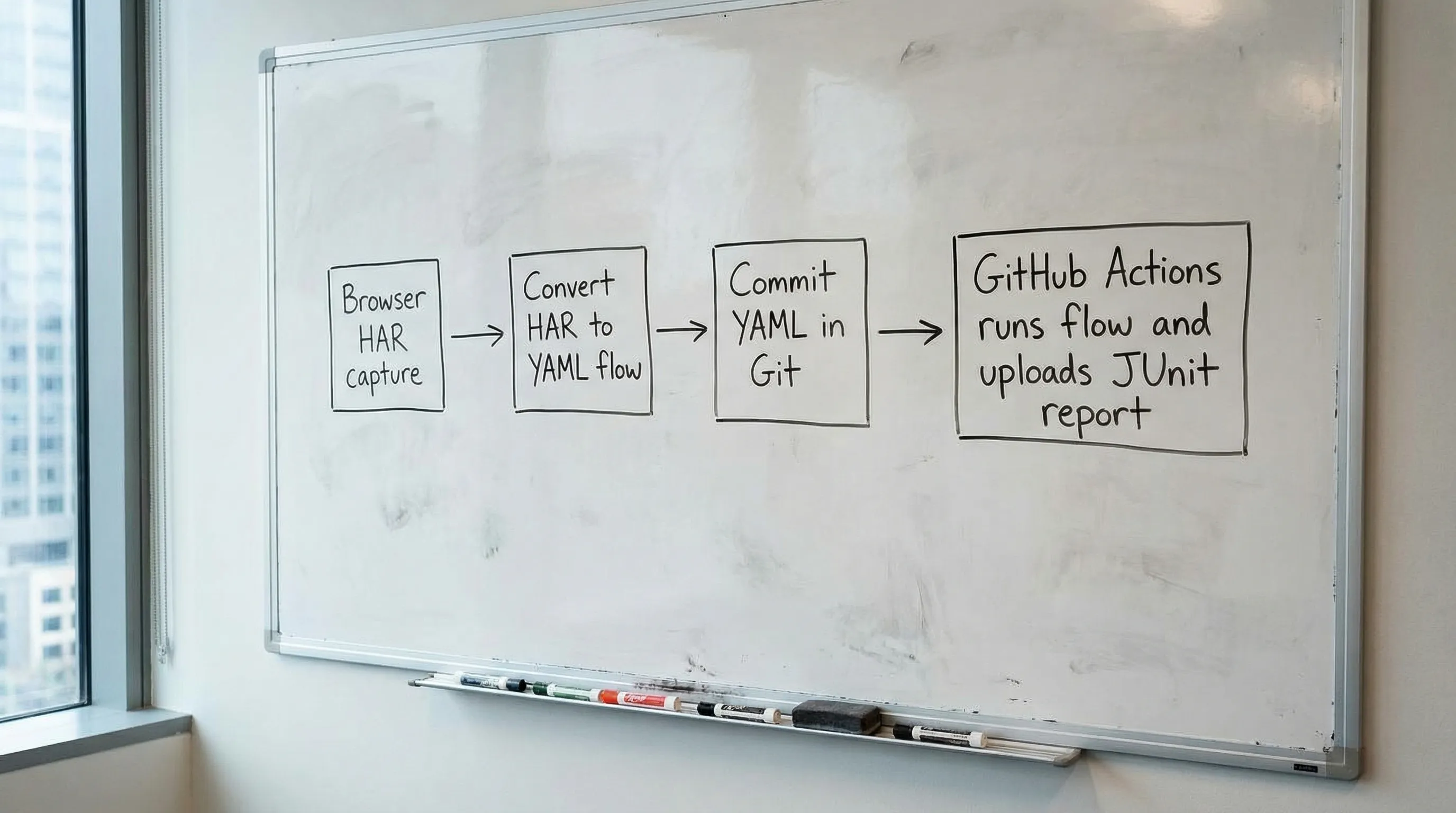
- Capture a HAR for a representative user journey
- Convert HAR to YAML flow
- Normalize the flow for determinism (strip noise, parameterize secrets, add assertions)
- Run it in CI and publish a test report
The rest of this guide expands each step.
Step 1: Capture a high-signal HAR (not a junk drawer)
Open Chrome DevTools (or equivalent), go to the Network tab, and record a single, focused scenario. Examples that translate well to API regression flows:
- login + fetch current user + fetch dashboard data
- create resource + read it back + update + delete
- payment intent creation (without completing a real charge) + status polling
Keep the capture tight. If your HAR contains 400 requests (fonts, analytics, feature flags, retries), your generated flow will inherit that mess.
Capture tips that improve the generated test
- Start from a clean state: new incognito window, no extensions, no service workers.
- Prefer one scenario per HAR. Multiple scenarios produce flows that are harder to maintain.
- If your app hits multiple hosts (api, auth, graphql, uploads), that is fine, but be intentional.
Step 2: Convert HAR to YAML
In DevTools, the core operation is “import HAR and generate a flow, then export YAML”. The important part is what you get out:
- a sequential flow that mirrors the request order
- variables mapped from earlier responses into later requests (request chaining)
- a human-readable YAML file that you can commit
The exact UI steps can change over time, but the invariant should be: HAR in, executable YAML out.
If you want background on the product model (HAR import, flow tree, variable mapping, YAML export), the announcement post is a useful reference: Introducing DevTools: Local-First API Testing.
Step 3: Make the YAML deterministic (the part CI will punish you for)
HAR captures reality, and reality includes noise. CI wants repeatability.
Your job after you convert HAR to YAML is to remove the nondeterminism and make inputs explicit.
Remove or parametrize volatile headers
Common offenders:
x-request-id,traceparent,b3,x-datadog-*- device hints like
sec-ch-ua* originandrefererif they change across environments- cookies that should be replaced by token-based auth
A pragmatic rule is: keep only headers that your API actually uses for routing, auth, or content negotiation.
Replace secrets with CI-provided inputs
Never commit real session cookies or bearer tokens.
Instead:
- use CI secrets for credentials (or test tokens)
- obtain short-lived tokens inside the flow (preferred)
- pass environment-specific base URLs as variables
Make request chaining explicit
The major win of “convert HAR to YAML” is that you can turn implicit browser state into explicit flow state.
A typical pattern:
- Request A (Login) returns
access_tokenin the response body - Request B references
{{Login.response.body.access_token}}in its Authorization header - Request C uses an
idfrom Request B's response:{{CreateResource.response.body.id}}
Below is an example using the DevTools YAML format, showing request chaining and validation:
env:
  BASE_URL: '{{BASE_URL}}'

flows:
  - name: UserFlow
    steps:
      - request:
          name: Login
          method: POST
          url: '{{BASE_URL}}/auth/login'
          headers:
            Content-Type: application/json
          body:
            username: '{{E2E_USER}}'
            password: '{{E2E_PASS}}'

      - js:
          name: ValidateLogin
          code: |
            export default function(ctx) {
              if (ctx.Login?.response?.status !== 200) throw new Error("Login failed");
              if (!ctx.Login?.response?.body?.access_token) throw new Error("No token");
              return { validated: true };
            }
          depends_on: Login

      - request:
          name: GetCurrentUser
          method: GET
          url: '{{BASE_URL}}/v1/me'
          headers:
            Authorization: 'Bearer {{Login.response.body.access_token}}'
          depends_on: Login

      - js:
          name: ValidateUser
          code: |
            export default function(ctx) {
              if (ctx.GetCurrentUser?.response?.status !== 200) throw new Error("Expected 200");
              if (!ctx.GetCurrentUser?.response?.body?.id) throw new Error("Missing id");
              return { validated: true };
            }
          depends_on: GetCurrentUser
What matters for CI is not the exact key names, it is the discipline:
- reference node outputs directly (e.g.
{{Login.response.body.access_token}}) - reuse everywhere
- validate on behavior, not incidental fields (using
js:nodes)
Assert the right things
A good regression test catches breaking changes without being brittle.
Prefer:
- status codes
- presence of required fields
- schema-like checks on types and invariants
- “contract” values (feature flags, role names, permission sets)
Avoid:
- timestamps
- randomly ordered arrays (unless you sort)
- opaque IDs that are expected to change
Optional but useful: split one giant flow into smaller ones
HAR import often yields a monolithic sequence. In Git, smaller flows are easier to review and own.
A practical split is by contract boundary:
auth.yamlusers.yamlbilling.yaml
Even if you keep one “end to end” flow, having smaller contract-level flows usually produces faster and clearer CI feedback.
Step 4: Run the YAML flow in GitHub Actions (JUnit output)
For CI, you want three things:
- deterministic inputs (base URL, credentials)
- parallel execution where it is safe
- machine-readable test reports (JUnit) so failures show up in PR checks
DevTools provides a CLI runner designed for local and CI execution. The DevTools site already includes a CI-focused guide and a GitHub Actions example you can adapt: Faster CI with DevTools CLI.
Below is a GitHub Actions workflow skeleton showing the integration points. Replace the runner invocation with the exact command and flags you use in your repo (for example, JUnit output path, parallelism, and flow selection).
name: api-regression

on:
  pull_request:
  push:
    branches: [main]

jobs:
  run-flows:
    runs-on: ubuntu-latest

    env:
      BASE_URL: ${{ secrets.E2E_BASE_URL }}
      E2E_USER: ${{ secrets.E2E_USER }}
      E2E_PASS: ${{ secrets.E2E_PASS }}

    steps:
      - uses: actions/checkout@v4

      # Install DevTools CLI (use your preferred install method)
      - name: Install DevTools CLI
        run: |
          echo "Install step here (see DevTools CLI guide)"

      - name: Run API regression flows
        run: |
          # Example shape, adjust to your CLI:
          # devtools run ./flows --junit ./reports/junit.xml --parallel 8
          echo "Run flows here"

      - name: Upload test report
        if: always()
        uses: actions/upload-artifact@v4
        with:
          name: junit-report
          path: reports/
Practical CI notes (what usually breaks)
- Concurrency vs shared state: do not parallelize flows that mutate the same account/resource namespace unless you isolate data.
- Rate limits: set per-job parallelism to match your staging limits.
- Flaky dependencies: if a flow depends on async work, make polling explicit and bounded.
If you are migrating from Newman, the biggest mental shift is that your "collection + environments" becomes "flows + env variables and node output references", and the YAML is the unit of review.
What to commit (and what not to commit)
A clean repo layout keeps this sustainable.
Commit:
flows/*.yaml(the generated and edited flows)- a short README documenting required env vars and how to run locally
Do not commit:
- HAR files with tokens or user PII
- raw cookies
- environment-specific base URLs hard-coded into flows
If you need to keep HAR files for debugging conversions, treat them as sensitive artifacts and store them outside the repo (or heavily sanitized).
Debugging: when the converted flow fails but the browser worked
This is common, and it is usually one of these:
Hidden state: cookies, CSRF, and redirects
Browsers handle cookie jars and redirects automatically. Your flow runner will do exactly what the flow says.
Fix by:
- extracting CSRF tokens explicitly
- deciding whether to rely on cookie auth or switch to bearer tokens
- making redirect handling explicit if your API uses it
Request ordering and racing
HAR is a timeline, but modern apps fire requests concurrently.
A sequential flow might need small adjustments:
- remove speculative requests
- ensure the “create” finishes before the “read”
- add bounded retries for eventual consistency
Environment mismatch
If your frontend hits api.prod.example.com but CI should hit staging, you need a single BASE_URL variable and no hostnames sprinkled through the flow.
When HAR to YAML is the wrong tool
HAR-derived tests are great for regression coverage, but not ideal when:
- you need pure contract tests independent of any UI journey
- you need property-based generation or fuzzing
- you cannot capture traffic because the scenario is backend-only
In those cases, you can still author YAML flows manually, but HAR import shines when you want realistic, end-to-end request traces quickly.
Frequently Asked Questions
Can I convert HAR to YAML if my app uses OAuth or SSO? Yes, but you usually do not want to replay the full browser SSO dance in CI. A common approach is to authenticate via a test-only credential flow, or exchange a refresh token, then chain the resulting access token through the rest of the flow.
Should I commit HAR files to the repo? Usually no. HAR often contains cookies, bearer tokens, and PII. Commit the sanitized YAML flow and keep HAR only as a local or secured artifact if you need it for regeneration.
How do I keep YAML regression tests stable across environments? Parameterize base URLs and credentials via environment variables, strip volatile headers, and assert on stable API contract behavior (status codes and required fields).
How is this better than Postman/Newman in CI? The main win is that the artifact you run is the artifact you review: readable YAML stored in Git, rather than UI-managed collections and JSON exports that are harder to diff and merge.
How does this compare to Bruno? Bruno improves “tests in Git”, but DevTools’ workflow here is specifically about turning real browser HAR traffic into executable YAML flows and running them cleanly in CI.
Build your HAR-derived regression suite (without UI-locked tests)
If you are trying to get from “the frontend made these calls” to “we have CI regression coverage we can review in PRs”, DevTools is designed for that workflow: import HAR, export YAML, commit, and run locally or in GitHub Actions.
Start with the docs and guides at DevTools, and if you are migrating from Newman, use the CI guide as your baseline: Faster CI with DevTools CLI.