
 Star on GitHub
GitHub Flow Explained for API Testing Teams
Modern API testing teams ship changes constantly: new endpoints, auth tweaks, schema updates, edge-case fixes. The hard part is not writing a test, it is coordinating test changes safely across developers, QA, and CI without slowing delivery.
That is exactly why GitHub Flow matters. It is a lightweight branching model built around short-lived branches, pull requests, and continuous integration. When you apply it intentionally to API testing assets (flows, fixtures, contract checks, assertions), it becomes a repeatable way to keep tests reviewable, reliable, and always ready to run.
What is GitHub Flow?
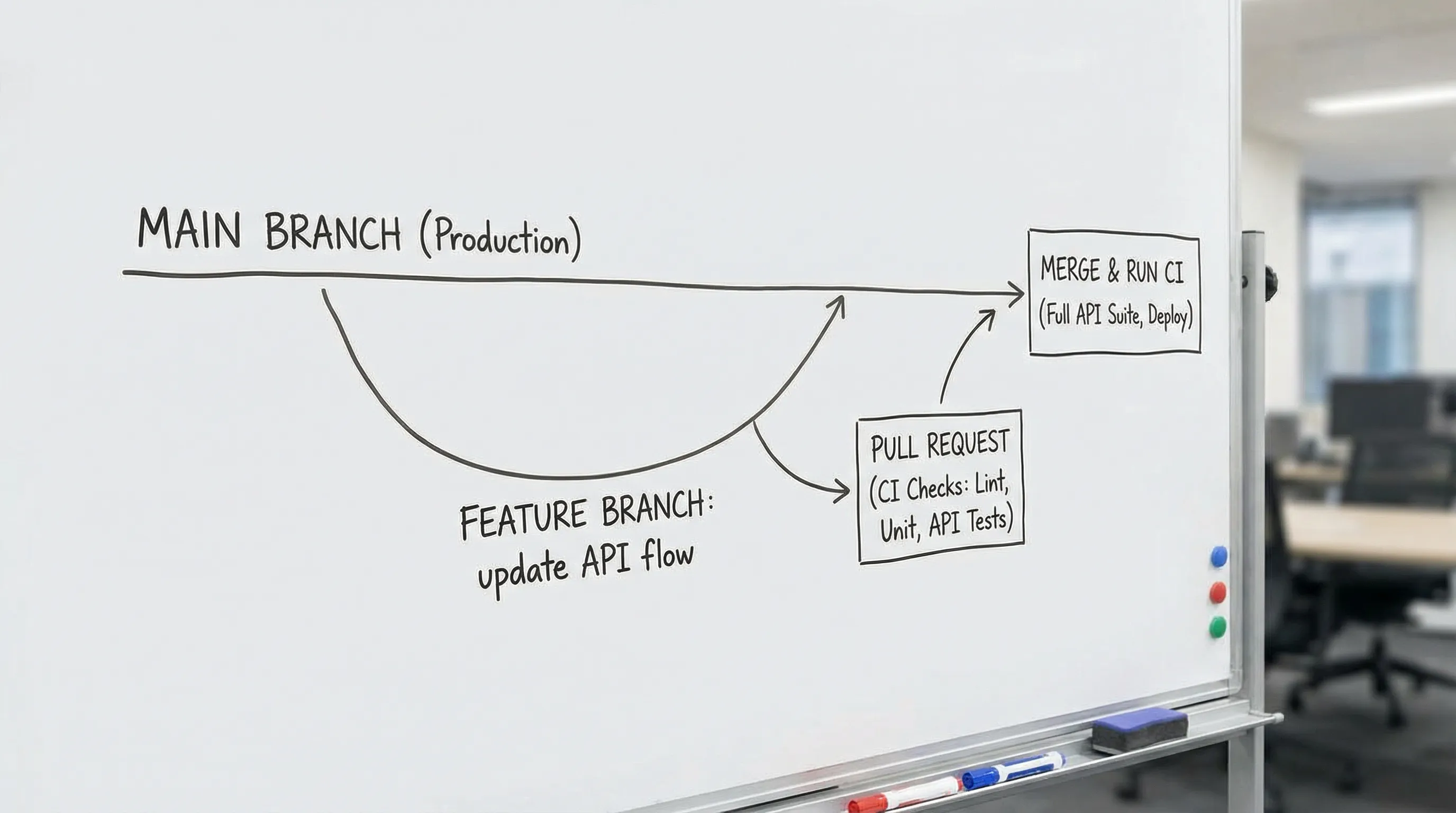
GitHub Flow is a simple workflow for shipping small, safe changes frequently:
- Create a branch from
main - Make commits
- Open a pull request (PR)
- Run automated checks and get review
- Merge to
main - Deploy or release from
main
GitHub documents the model here: Understanding the GitHub flow.
At a high level, it is a form of trunk-based development where main stays releasable. For API testing teams, “releasable” means your test suite (and the artifacts it depends on) remains runnable and trustworthy.
GitHub Flow vs Git Flow (and why testing teams usually prefer Flow)
Many teams start with Git Flow (feature branches plus long-lived develop, release branches, hotfix branches). It can work, but it adds coordination overhead that often conflicts with how API tests evolve: lots of small adjustments, frequent refactors, and constant CI feedback.
Here is a practical comparison for API testing work:
| Topic | GitHub Flow | Git Flow |
|---|---|---|
| Long-lived branches | Typically just main | Often main + develop + release branches |
| PR size | Encourages small changes | PRs can grow or stay open longer |
| CI feedback loop | Tight, PR-centric | More branching paths, more integration moments |
| Best fit | Continuous delivery, fast iteration | Scheduled releases, heavier governance |
| API test maintenance | Easier to keep tests aligned with current behavior | Higher risk of drift between branches |
If your API tests are meant to run on every PR and represent current behavior, GitHub Flow is usually the lower-friction default.
What “a change” means in API testing (beyond just test code)
API testing repositories are rarely just “test code.” They often include a mix of:
- Executable API flows (multi-step sequences like login, create resource, fetch resource)
- Assertions (status codes, schema checks, business rules)
- Fixtures and seed data (users, tokens, example payloads)
- Environment configuration (base URLs, feature flags)
- CI wiring (GitHub Actions workflows, reporting formats)
GitHub Flow works best when these artifacts are:
- Versioned alongside the app or API contract
- Easy to review in a PR
- Deterministic enough to run repeatedly in CI
That is why many teams prefer storing API workflows in readable text formats (for example, YAML) rather than opaque binaries or purely UI-managed state.
A GitHub Flow repo structure that works for API testing teams
There is no single correct layout, but you want reviewers to quickly answer: “What changed, why, and what will CI run?”
A common, review-friendly structure looks like this:
repo/
  flows/
    auth.yaml
    orders-smoke.yaml
    payments-regression.yaml
  data/
    payloads/
    user-create.json
    order-create.json
  ci/
    README.md
  .github/
    workflows/
      api-tests.yml
Principles that make GitHub Flow smoother:
- Keep flows small and composable so feature branches stay short-lived.
- Keep test data close to the flows that use it.
- Keep CI configuration visible and simple.
How to run API tests in GitHub Flow: the PR is the quality gate
In GitHub Flow, the pull request is where you prove the change is safe. For API testing, that means your PR should do two things:
- Explain what API behavior is being validated.
- Provide automated evidence (CI checks) that the flow passes.
A practical PR checklist for API flows
These checks prevent the most common sources of flaky API automation:
- Determinism: Avoid time-dependent assertions and random data unless you control it.
- Idempotency: If the flow creates resources, ensure it cleans up or uses unique identifiers.
- Secrets handling: No hard-coded tokens or credentials committed to the branch.
- Assertions that matter: Validate business outcomes, not only “status is 200.”
- Backward compatibility: If the API changed, update the flow and the expected contract together.
If you treat that checklist as part of code review, GitHub Flow becomes a training tool for the whole team, not just a branching convention.
CI in GitHub Flow for API testing: fast feedback, then deeper checks
Most teams get the best results by running different scopes of API tests at different times:
- On every PR: smoke flows, critical auth flows, contract checks that catch breaking changes quickly.
- After merge to
main: broader regression flows, load-adjacent checks, longer-running suites.
GitHub Actions makes this straightforward, and GitHub Flow encourages it because the PR is the “merge decision point.”
If you publish JUnit reports, you can also get consistent test reporting across tools (and easier debugging when something fails).
For GitHub Actions concepts like environments and protections, see GitHub’s docs on environments.
Environments and secrets: keep PRs safe without blocking iteration
API tests frequently need secrets: client credentials, test user passwords, API keys, or service tokens. GitHub Flow is not “no process,” it is “just enough process.”
Common patterns:
- Use GitHub Secrets for CI tokens, never commit them.
- Use GitHub Environments to separate
stagingvsproductioncredentials, with approval gates if needed. - For sensitive deployments, keep write access to
mainprotected with branch rules and required checks.
This lets contributors iterate freely on branches while ensuring merges to main still meet your org’s security posture.
Example: GitHub Flow applied to an API change
Imagine your API team adds an optional field couponCode to an order creation endpoint. Here is how GitHub Flow keeps API tests aligned:
Branch and update the flow
Create a short-lived branch:
git checkout -b test/orders-coupon-code
Update or add a flow that covers the new behavior. If your flows are stored as YAML, reviewers can see exactly what changed.
# flows/orders-smoke.yaml
- name: Create order with coupon
  request:
    method: POST
    url: "{{BASE_URL}}/orders"
    json:
      items:
        - sku: "ABC-123"
          qty: 1
      couponCode: "WELCOME10"
  expect:
    status: 201
Open a PR and let CI validate it
In the PR:
- Link to the API change (issue, spec, or PR)
- Explain what the new flow covers
- Confirm CI runs the updated flow
If CI fails, you fix it on the same branch until checks are green.
Merge and keep main releasable
Once merged, the test becomes part of your always-current suite. That is the core promise of GitHub Flow: main stays in a state where it can be released (and your API tests remain runnable).
Where DevTools fits (without changing your GitHub Flow)
GitHub Flow is a process. You still need tooling that makes API workflows easy to create, review, and run.
DevTools is designed around that reality:
- HAR to API flow conversion: Turn real browser traffic into executable API workflows.
- Automatic variable mapping: Reduce manual parameter wiring when requests depend on prior responses.
- YAML export for Git review: Make flow changes visible in PR diffs.
- Local-first and offline support: Build and debug flows without needing a hosted workspace.
- CLI with CI integration: Run flows in CI and generate JUnit/JSON reporting.
If you want a hands-on example of CI execution, DevTools also publishes a guide on using the CLI in GitHub Actions: Faster CI with DevTools CLI.
Common pitfalls when adopting GitHub Flow for API testing
Letting branches live too long
If test branches stay open for weeks, your flows drift away from main, and merges become painful. Prefer smaller PRs that introduce a single flow change or a small set of related assertions.
Treating API tests as “secondary” to app code
When tests live in a separate repo and update on a different cadence, GitHub Flow loses its biggest benefit: a single source of truth for what main means. If you can, version your flows with the API contract or alongside the services they validate.
Flaky tests that block merges
Required checks only work if developers trust them. Invest in determinism (stable data, stable assertions, reliable environments) before you make “all tests must pass” a hard gate.
Frequently Asked Questions
Is GitHub Flow the same as trunk-based development? GitHub Flow is a lightweight, PR-driven variant of trunk-based development. The key idea is that main stays releasable, with short-lived branches merged frequently.
Should API testing teams use one branch per endpoint change? Usually yes, keep branches small and focused. If a single feature touches multiple endpoints, one branch is still fine as long as the PR stays reviewable.
What should run on every PR for API tests? Prioritize fast, high-signal checks: auth flows, a smoke suite, and contract checks that catch breaking changes early. Run longer regressions after merge to main.
How do we review API workflows effectively in PRs? Store them in a diff-friendly format (commonly YAML or JSON), keep flows small, and require meaningful assertions so reviewers can judge behavior, not just “it runs.”
Can GitHub Flow work with multiple environments like staging and production? Yes. Use GitHub Actions environments and secrets to separate credentials and add approvals where needed, while keeping the same branch and PR model.
Put GitHub Flow into practice with reviewable API flows
If your team wants GitHub Flow to work well for API testing, the biggest unlock is making workflows easy to create and easy to review. DevTools Studio converts real browser traffic (HAR files) into replayable API flows, exports them as Git-friendly YAML, and runs them locally or in CI via CLI.
Explore DevTools at dev.tools and see how local-first, PR-reviewable flows can fit cleanly into your existing GitHub Flow process.
This post is part of the API Testing in CI/CD guide — the complete resource for moving API tests from manual tools into automated pipelines.