
 Star on GitHub
GitHub CI CD for API Tests: Parallel Runs and JUnit Artifacts
PR gates for API changes only work if your CI run is fast enough to run on every pull request, and readable enough that people fix failures instead of re-running “just in case”. In GitHub CI/CD, that usually comes down to two things:
- Parallel runs so regression suites finish in minutes, not hours.
- JUnit artifacts so failures render as structured test results, not a wall of logs.
This post focuses on the mechanics: how to shard YAML-based API flows safely, run them in parallel in GitHub Actions, and publish JUnit XML that stays stable across refactors.
What you are optimizing for in GitHub CI/CD API testing
For experienced teams, “run tests in CI” is not the goal. You want a pipeline with these properties:
- Deterministic selection: the same commit runs the same tests, regardless of runner timing.
- Parallel safety: shards do not race on shared state (tenants, IDs, rate limits, mutable fixtures).
- Stable identities: each test case has a consistent name so GitHub can show deltas over time.
- Auditable outputs: when a shard fails, you can download the exact JUnit + logs that explain why.
YAML-first definitions help here because the tests are already “CI-shaped”: diffable in PRs, reviewable without a GUI, and portable across runners.
Make flows parallel-safe before you parallelize them
Parallelization mostly exposes problems you already had: hidden coupling, shared mutable state, and implicit ordering.
Rule 1: isolate data per run
Give every CI run (and often every shard) a unique namespace so create/update/delete steps never collide.
- Use a
RUN_ID(commit SHA + attempt) and inject it into request bodies, headers, or resource names. - Prefer idempotent create patterns when the API supports it (idempotency keys, PUT with stable IDs).
Rule 2: keep request chaining explicit
Chained tests are fine in CI as long as the dependencies are explicit and local to the flow. Avoid “step 7 assumes step 2 created a user in a different file”.
An illustrative YAML pattern for chaining looks like this (the exact schema varies by runner, the important part is the explicit extraction and reuse):
name: user-lifecycle
vars:
  base_url: ${env.BASE_URL}
  run_id: ${env.RUN_ID}

steps:
  - id: login
    request:
      method: POST
      url: ${vars.base_url}/auth/login
      json:
        email: ${env.TEST_EMAIL}
        password: ${env.TEST_PASSWORD}
    extract:
      token: $.token
    assert:
      status: 200

  - id: create_user
    request:
      method: POST
      url: ${vars.base_url}/users
      headers:
        Authorization: Bearer ${steps.login.extract.token}
      json:
        email: ci+${vars.run_id}@example.com
    extract:
      user_id: $.id
    assert:
      status: 201

  - id: delete_user
    request:
      method: DELETE
      url: ${vars.base_url}/users/${steps.create_user.extract.user_id}
      headers:
        Authorization: Bearer ${steps.login.extract.token}
    assert:
      status: 204
This is where YAML-first tools tend to be stronger than Postman collections in practice.
- In Postman/Newman, the “source of truth” often drifts into UI state plus scripts, and collection exports are JSON with noisy diffs.
- In Bruno, definitions live in files, but they are still a tool-specific format rather than plain YAML.
- With native YAML flows (for example, DevTools’ YAML-first approach), the review surface is your PR diff, not a workspace UI.
Rule 3: cap and scope retries
Retries should be local (per request or per step), bounded, and only for errors that are safe to retry. Blind suite-level retries can make a flaky system look “green” while hiding real regressions.
Rule 4: avoid shared fixtures across shards
A common anti-pattern is a “global seed” flow that populates shared state, then all shards depend on it.
If you need seeding:
- Seed per shard with shard-specific IDs.
- Or run a single seed job, then run tests against immutable data.
Sharding strategy: shard by files, not by runtime discovery
For GitHub Actions, the simplest deterministic sharding strategy is file-based:
- Put each flow in its own YAML file.
- Shard by splitting the file list into N buckets.
This avoids the “dynamic test discovery” complexity you see in some frameworks, and keeps the mapping from file to JUnit testsuite stable.
A practical convention:
flows/smoke/*.yamlfor PR gating (fast)flows/regression/**/*.yamlfor nightly or merge-queue runs (wide)
Deterministic shard assignment
Two common approaches:
- Even slicing: split the sorted list into N contiguous chunks. Simple, but can skew if tests have different runtimes.
- Hash bucketing: assign each filename to a shard by hashing the path mod N. More stable when the list changes.
If your runner already supports sharding, use it. If not, a small wrapper script in CI is usually enough.
GitHub Actions: parallel matrix + per-shard JUnit artifacts
Below is a pattern you can adapt. It runs shards in parallel, uploads JUnit XML from each shard, then merges and publishes a unified report.
Key points:
- Each shard produces
junit.xmlwith stable suite and case names. - Artifacts always upload, even if the shard fails.
- A final job aggregates results.
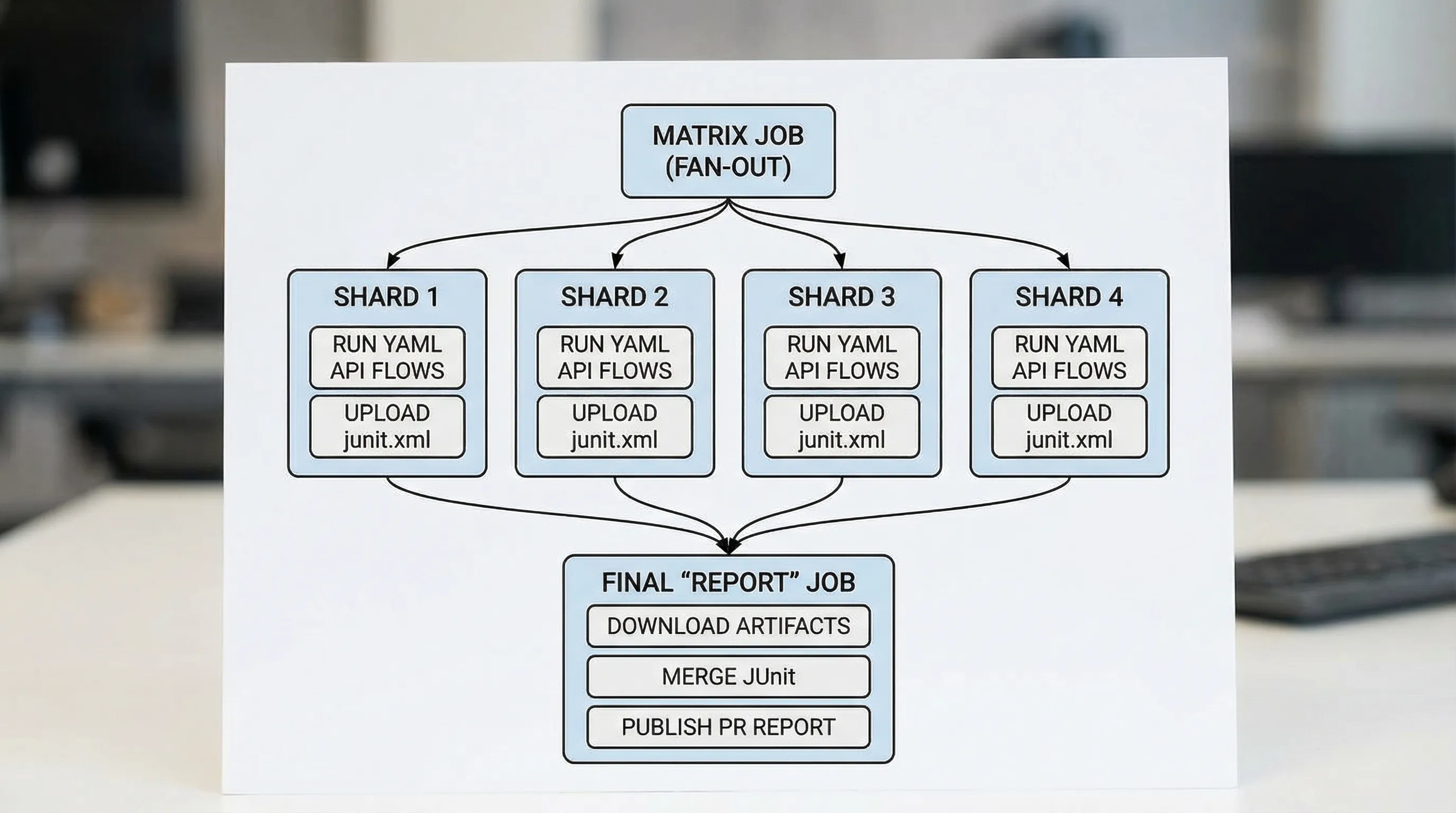
Example workflow (adapt the runner command)
name: api-tests

on:
  pull_request:

concurrency:
  group: api-tests-${{ github.ref }}
  cancel-in-progress: true

jobs:
  shard:
    runs-on: ubuntu-24.04
    strategy:
      fail-fast: false
      matrix:
        shard: [0, 1, 2, 3]

    steps:
      - uses: actions/checkout@v4

      - name: Set run id
        run: echo "RUN_ID=${GITHUB_SHA::7}-${GITHUB_RUN_ATTEMPT}-s${{ matrix.shard }}" >> $GITHUB_ENV

      - name: Run API flows (shard)
        env:
          BASE_URL: ${{ secrets.BASE_URL }}
          TEST_EMAIL: ${{ secrets.TEST_EMAIL }}
          TEST_PASSWORD: ${{ secrets.TEST_PASSWORD }}
          RUN_ID: ${{ env.RUN_ID }}
        run: |
          mkdir -p out
          # Replace this with your runner invocation.
          # If you use DevTools, wire its CLI to run a shard and emit JUnit XML.
          ./run-flows.sh \
            --flows "flows/regression" \
            --shard-index "${{ matrix.shard }}" \
            --shard-total "4" \
            --junit "out/junit.xml" \
            --log "out/runner.log"

      - name: Upload shard artifacts
        if: always()
        uses: actions/upload-artifact@v4
        with:
          name: shard-${{ matrix.shard }}
          path: out/
          retention-days: 14

  report:
    runs-on: ubuntu-24.04
    needs: [shard]
    if: always()

    steps:
      - name: Download artifacts
        uses: actions/download-artifact@v4
        with:
          path: artifacts

      - name: Merge JUnit (example)
        run: |
          mkdir -p merged
          # Implement merge with your preferred tool.
          # Many teams use a small script or a JUnit merge utility.
          python3 scripts/merge_junit.py artifacts/**/junit.xml > merged/junit.xml

      - name: Publish test report
        if: always()
        uses: dorny/test-reporter@v1
        with:
          name: API Tests
          path: merged/junit.xml
          reporter: java-junit

      - name: Upload merged report
        if: always()
        uses: actions/upload-artifact@v4
        with:
          name: junit-merged
          path: merged/junit.xml
          retention-days: 14
Notes for production hardening:
- Pin action versions to commit SHAs if you need maximum determinism.
- Consider running a smaller smoke suite on
pull_request, and the full regression suite onpushto main orschedule.
If you are using DevTools as the runner, wire the “Run API flows (shard)” step to the DevTools CLI and its JUnit output. The runner detail is intentionally isolated to one line so you can swap tools without rewriting the workflow.
JUnit that stays readable in GitHub
JUnit is not just a checkbox. The structure determines whether failures are actionable.
Use stable naming conventions
A pragmatic convention that works well for YAML flows:
testsuite name: flow file path (exampleflows/regression/user-lifecycle.yaml)testcase name: step ID or step name (examplecreate_user)
This makes refactors less painful:
- Renaming a file is a rename in Git, and the suite name changes predictably.
- Reordering steps does not scramble identities.
Put the right data in failure messages
JUnit failure output should answer:
- What assertion failed (status, JSONPath, header, timing budget)
- What value was observed
- Which request produced it (method + path)
Avoid embedding secrets, full auth headers, or entire response bodies by default. Prefer redacted snippets and attach full logs as artifacts.
Always upload artifacts, even on failure
CI failures are when artifacts matter most. Make uploads conditional on always() so you can debug without re-running.
A useful minimal artifact bundle per shard:
| Artifact | Why it matters | Where it should live |
|---|---|---|
junit.xml | PR-visible failures, merge gates | CI artifact |
runner.log | Execution trace, retries, timing | CI artifact |
run.json (optional) | Machine-readable details for tooling | CI artifact |
| Flow YAML | The test definition | Git repo |
Parallel runs meet request chaining: common failure modes
Parallelization does not break chaining inside a flow. It breaks hidden coupling across flows.
Symptom: intermittent 409, 429, or “already exists”
Causes:
- Shared usernames/emails/IDs
- Global fixed idempotency keys
- API rate limits hit by N shards at once
Fixes:
- Inject
RUN_IDinto resource identifiers. - Reduce shard count for rate-limited environments.
- Add rate-limit aware backoff for specific endpoints.
Symptom: flaky “eventual consistency” assertions
Cause:
- Shards amplify timing variability, and your polling is unbounded.
Fixes:
- Use bounded polling (max attempts + sleep).
- Assert invariants, not timestamps and volatile fields.
Postman/Newman vs Bruno vs YAML-first flows in GitHub CI/CD
The tool choice shows up most in Git diffs, sharding, and reporting.
| Concern | Postman + Newman | Bruno | Native YAML flows (example: DevTools) |
|---|---|---|---|
| Source of truth | UI workspace + exported JSON | File-based, tool format | Plain YAML in Git |
| PR review quality | Noisy diffs, scripts in JS | Better than Postman, still custom | Clean diffs, direct review |
| Parallel sharding | Possible, often awkward | Possible with scripting | Natural: shard files, run flows |
| JUnit mapping | Varies by reporter, naming can drift | Depends on tooling | Stable: suite = file, case = step |
If your pain is GitHub CI/CD rather than local exploration, you want definitions that behave like code: readable diffs, predictable naming, and deterministic execution.
A practical PR gate pattern (what to run, when)
A good default split:
- On PR: smoke flows only, 2 to 4 shards, strict time budget.
- On main (post-merge): broader regression, more shards if the environment can handle it.
- Nightly: full suite plus slower “eventually consistent” workflows, longer timeouts, deeper artifacts.
This keeps developer feedback tight without pretending your entire system is stable enough to be gated on every edge case every time.
One non-obvious CI lesson: operationalize the boring parts
A lot of CI reliability is unglamorous work: naming conventions, artifact retention, pinning versions, and keeping pipelines deterministic. Many engineering teams do this in-house, but the general principle applies across disciplines, for example growth teams sometimes rely on a managed service to keep complex operational systems from becoming a distraction.
If you are using DevTools: where it fits
DevTools’ fit in this workflow is straightforward:
- Flows are native YAML, so sharding by file path and reviewing changes in PRs is natural.
- Flows can represent multi-step request chaining as first-class workflow tests.
- Runs can emit CI-friendly reports (including JUnit) so GitHub shows failures cleanly.
If your current setup is Postman collections plus Newman, the practical upgrade is not “more features”. It is moving the test definition into Git-native YAML, then building a pipeline where parallel runs and JUnit artifacts are the default, not an afterthought.