
 Star on GitHub
GitHub Actions for YAML API Tests: Parallel Runs + Caching (Copy-Paste Workflow)
Your CI runtime for API regression tests usually comes down to two things:
- how much work you do per job (serial execution), and
- how much you re-download on every run (tooling plus dependencies).
If you store tests as native YAML flows (not UI-locked collections), you can shard by files, run shards in parallel, and keep the whole thing reviewable in pull requests.
This post gives you a single, copy-paste GitHub Actions workflow that:
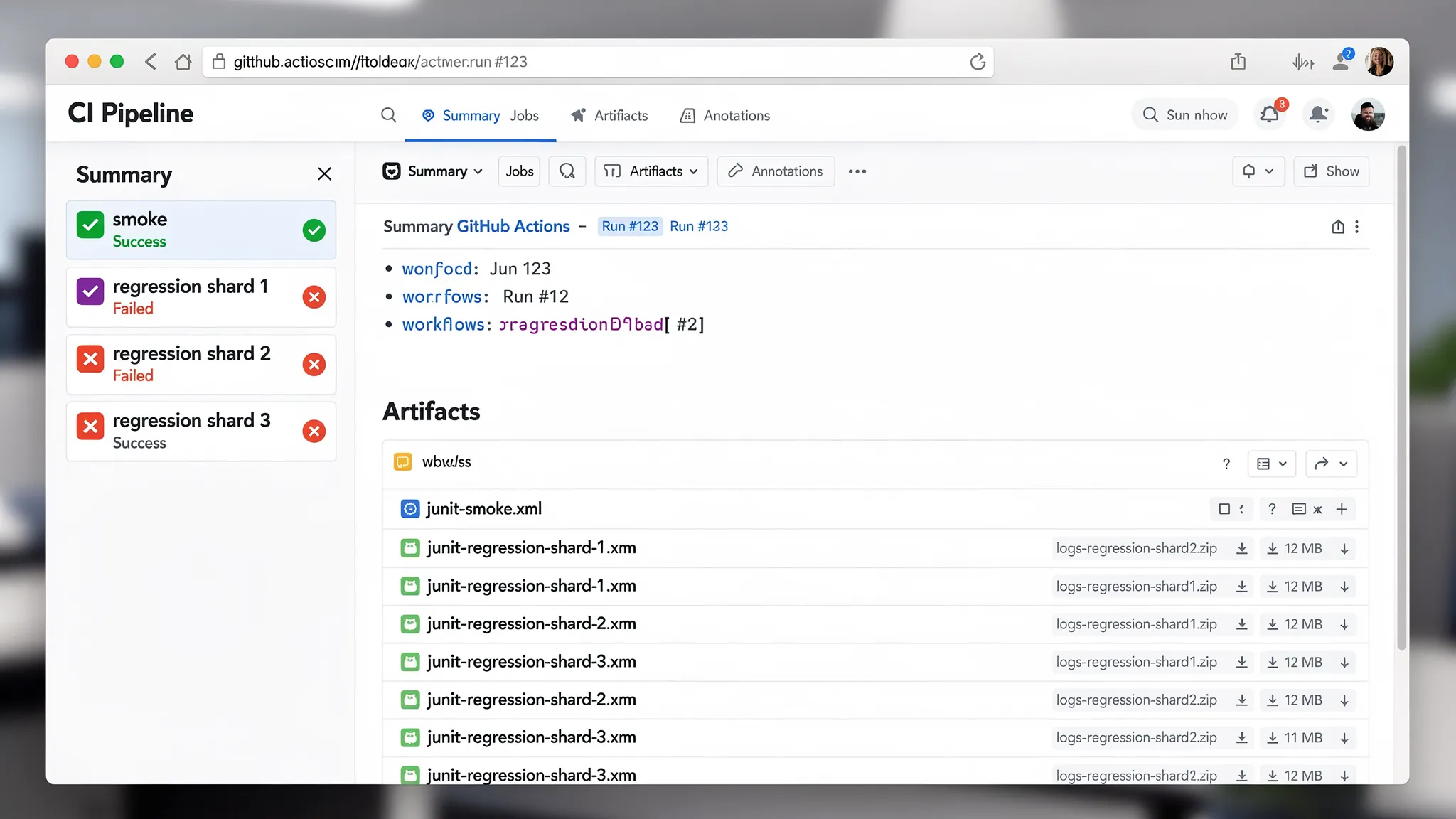
- Runs YAML API tests in parallel via a matrix (smoke + regression shards)
- Caches the DevTools CLI install and your repo dependencies
- Cancels redundant in-progress runs on the same branch/PR
- Uploads JUnit XML + logs as artifacts even when tests fail
The net effect is typically going from something like 6m → 2m for a medium regression suite once you combine sharding and caching.
Why YAML tests make parallelization simpler than Postman/Newman
With Postman, your “test definition” is a collection JSON plus scripts, and parallelization usually means awkward slicing by folders, multiple Newman invocations, or duplicating state setup.
With YAML-first flows committed to Git:
- You can shard by file path deterministically.
- Diffs stay readable (reviewers can see exactly what changed).
- Request chaining is explicit in YAML (tokens, IDs, and extracted fields are not hidden in UI state).
Tools like Bruno improve on the Postman UI-lock problem, but you still end up with tool-specific formats and conventions. With DevTools, the workflow artifact is plain YAML, so your GitHub workflows can treat test files like any other code.
Copy-paste workflow: parallel matrix, caching, concurrency, artifacts
Create .github/workflows/api-yaml-tests.yml with the following content.
A couple of values are intentionally centralized at the top (DEVTOOLS_CLI_URL, DEVTOOLS_CLI_VERSION) so you can pin and cache cleanly.
name: YAML API Tests (parallel + cached)

on:
  pull_request:
  push:
    branches: [main]
  workflow_dispatch:

permissions:
  contents: read

concurrency:
  group: yaml-api-tests-${{ github.workflow }}-${{ github.event.pull_request.number || github.ref }}
  cancel-in-progress: true

env:
  # Pin the DevTools CLI version for deterministic CI.
  # Update these in one place when you bump versions.
  DEVTOOLS_CLI_VERSION: "0.1.0"
  # Provide a direct download URL to the CLI binary for linux-x64.
  # Example: a GitHub Releases asset URL, or an internal artifact URL.
  DEVTOOLS_CLI_URL: "CHANGE_ME_TO_A_LINUX_X64_BINARY_URL"

  # Optional: point DevTools at an environment file or pass env vars directly.
  # Keep secrets in GitHub Actions secrets, not in repo.
  DT_ENV_FILE: "env/ci.yaml"

jobs:
  api-tests:
    name: ${{ matrix.name }}
    runs-on: ubuntu-24.04
    timeout-minutes: 20

    strategy:
      fail-fast: false
      matrix:
        include:
          - name: smoke
            suite: smoke
            shard: 1
            shard_total: 1
          - name: regression-1
            suite: regression
            shard: 1
            shard_total: 3
          - name: regression-2
            suite: regression
            shard: 2
            shard_total: 3
          - name: regression-3
            suite: regression
            shard: 3
            shard_total: 3

    steps:
      - name: Checkout
        uses: actions/checkout@v4

      - name: Cache DevTools CLI
        id: cache-devtools
        uses: actions/cache@v4
        with:
          path: |
            ~/.local/bin/devtools
            ~/.cache/devtools
          key: devtools-cli-${{ runner.os }}-${{ env.DEVTOOLS_CLI_VERSION }}

      - name: Install DevTools CLI (cache miss)
        if: steps.cache-devtools.outputs.cache-hit != 'true'
        run: |
          set -euo pipefail

          if [ "${DEVTOOLS_CLI_URL}" = "CHANGE_ME_TO_A_LINUX_X64_BINARY_URL" ]; then
            echo "DEVTOOLS_CLI_URL is not set. Update it to a downloadable linux-x64 DevTools CLI binary." >&2
            exit 2
          fi

          mkdir -p ~/.local/bin ~/.cache/devtools

          curl -fsSL "${DEVTOOLS_CLI_URL}" -o ~/.local/bin/devtools
          chmod +x ~/.local/bin/devtools

          # Smoke check (do not fail if your CLI uses a different version flag).
          ~/.local/bin/devtools --version || true

      - name: Add CLI to PATH
        run: echo "$HOME/.local/bin" >> "$GITHUB_PATH"

      # Dependency caching example (optional): if your test repo builds fixtures,
      # generates data, or runs a small helper in Node.
      - name: Setup Node (optional)
        if: ${{ hashFiles('package-lock.json') != '' }}
        uses: actions/setup-node@v4
        with:
          node-version: "20"
          cache: "npm"

      - name: Install Node deps (optional)
        if: ${{ hashFiles('package-lock.json') != '' }}
        run: npm ci

      - name: Select flows for this shard
        id: shard
        shell: bash
        run: |
          set -euo pipefail

          SUITE_DIR="flows/${{ matrix.suite }}"
          if [ ! -d "${SUITE_DIR}" ]; then
            echo "Suite directory not found: ${SUITE_DIR}" >&2
            exit 3
          fi

          # Deterministic file order.
          mapfile -t ALL < <(
            git ls-files "${SUITE_DIR}" \
              | grep -E '\\.(ya?ml)$' \
              | LC_ALL=C sort
          )

          if [ "${#ALL[@]}" -eq 0 ]; then
            echo "No YAML flows found under ${SUITE_DIR}" >&2
            exit 4
          fi

          SHARD=${{ matrix.shard }}
          TOTAL=${{ matrix.shard_total }}

          SELECTED=()
          for i in "${!ALL[@]}"; do
            idx=$((i + 1))
            if [ $(((idx - SHARD) % TOTAL)) -eq 0 ]; then
              SELECTED+=("${ALL[$i]}")
            fi
          done

          printf "%s\n" "${SELECTED[@]}" > .selected-flows.txt
          echo "count=${#SELECTED[@]}" >> "$GITHUB_OUTPUT"

          echo "Selected ${#SELECTED[@]} flow(s) for ${{ matrix.name }}" >> "$GITHUB_STEP_SUMMARY"

      - name: Run YAML API tests (DevTools)
        shell: bash
        run: |
          set -euo pipefail

          mkdir -p artifacts/junit artifacts/logs

          echo "Flows for this shard:" >&2
          cat .selected-flows.txt >&2

          # Run each flow independently so failures isolate to a specific file.
          # Adjust the CLI flags to match your DevTools runner.
          # See: https://dev.tools/guides/api-regression-testing-github-actions/
          EXIT=0

          while IFS= read -r FLOW; do
            BASE="$(basename "${FLOW}")"
            NAME="${BASE%.*}"
            JUNIT="artifacts/junit/${{ matrix.name }}__${NAME}.xml"
            LOG="artifacts/logs/${{ matrix.name }}__${NAME}.log"

            echo "==> ${FLOW}" >&2

            set +e
            devtools run "${FLOW}" \
              --env-file "${DT_ENV_FILE}" \
              --report-junit "${JUNIT}" \
              --log "${LOG}"
            CODE=$?
            set -e

            if [ $CODE -ne 0 ]; then
              EXIT=$CODE
            fi
          done < .selected-flows.txt

          exit $EXIT

      - name: Upload JUnit + logs (always)
        if: always()
        uses: actions/upload-artifact@v4
        with:
          name: api-test-artifacts-${{ matrix.name }}
          path: |
            artifacts
            .selected-flows.txt
          retention-days: 7
What to edit
DEVTOOLS_CLI_URL: set it to a downloadable Linux binary URL for your pinned CLI.DT_ENV_FILE: point it at the environment config you use in CI, or remove the flag and rely on environment variables.- The
devtools run ...flags: keep the structure, but align flags with your DevTools runner invocation. The workflow is intentionally designed so the GitHub Actions mechanics (matrix, caching, artifacts, concurrency) stay unchanged.
If you want a reference baseline for the runner invocation, use the DevTools guide on API regression testing in GitHub Actions.
How the matrix strategy actually shards your YAML flows
The matrix is explicit (via include) so you can control exactly what runs in parallel:
smoke: single shard, fast PR signalregression-1..3: 3 parallel shards
Sharding is file-based:
- list all YAML files under
flows/<suite> - sort deterministically
- select every Nth file (modulo) per shard
That matters because it avoids hidden coupling. If you have one monolithic Postman collection, splitting it safely is harder, and flaky order dependencies are common.
For best results, keep flows “small” and independent, and make request chaining explicit (token capture, ID capture, pagination cursors) so parallel shards do not fight over shared mutable state.
Caching: tool install plus dependencies
This workflow caches two separate things:
-
DevTools CLI install via
actions/cacheon~/.local/bin/devtoolskeyed byDEVTOOLS_CLI_VERSION. -
Repo dependencies via
actions/setup-nodewithcache: npm(only ifpackage-lock.jsonexists).
On GitHub-hosted runners, caching the CLI often saves 10 to 30 seconds per job, and caching Node dependencies can save 30 seconds to multiple minutes depending on your dependency graph.
If your suite has no external deps, keep the Node steps, but they will be skipped.
For deeper determinism, pin your GitHub Actions and runner images (see pinning Actions and tool versions).
Concurrency: cancel redundant runs
This line is what prevents burning CI minutes when someone force-pushes repeatedly:
concurrency:
  group: yaml-api-tests-${{ github.workflow }}-${{ github.event.pull_request.number || github.ref }}
  cancel-in-progress: true
It ensures that for a given PR (or branch push), only the latest run continues. Old runs are canceled automatically.
This is particularly important once you add parallel shards because 4 parallel jobs canceled early can save more time than any cache.
Artifacts: JUnit and logs are what you debug, not “green checkmarks”
Artifacts are uploaded with if: always() so you still get:
- JUnit XML (for PR annotations, historical comparisons, and triage)
- Runner logs (for a failure timeline and extracted variable values)
- The shard’s selected flow list (
.selected-flows.txt) so you can reproduce locally
A good artifact policy complements Git storage:
- Commit YAML flows (definitions) to Git.
- Upload per-run JUnit/logs as CI artifacts.
That split is covered in more depth in Auditable API test runs.
Where the “6m → 2m” speedup comes from (rough, realistic numbers)
Assume a regression suite that takes ~6 minutes serially (for example, ~60 flows at ~6 seconds average including network).
Here’s a typical breakdown after applying this workflow:
| Change | Before | After | Why it helps |
|---|---|---|---|
| Serial execution | ~6m | ~2m | 3 regression shards reduce wall time roughly by 3x (bounded by slowest shard) |
| No CLI cache | 15 to 30s/job | ~0s/job | Cached binary avoids repeated downloads |
| No dependency cache | 1 to 2m/job (if present) | 10 to 30s/job | setup-node restores npm cache |
| No cancelation | multiple redundant runs | latest only | cancel-in-progress stops wasted compute |
The exact numbers vary, but the pattern is stable: parallelization cuts wall time, caching cuts startup overhead, and concurrency reduces waste.
Practical request chaining rules for parallel CI
Parallel runs amplify hidden coupling. A few rules keep YAML flows deterministic and shard-friendly:
- Avoid shared accounts and shared mutable resources across shards. Create per-shard namespaces, or include a shard suffix in resource names.
- Make auth explicit. Capture tokens in the flow, do not rely on prior runs or browser state.
- Keep IDs stable in logs. Use stable step IDs and adjacent captures so you can trace a failure without re-running the entire suite.
If you are migrating from Postman, the biggest win is usually deleting “collection-global” implicit state and making it explicit in YAML. DevTools’ migration guide covers tactical steps: Migrate from Postman to DevTools.
FAQ
How do I split smoke vs regression suites? Put flows in flows/smoke/ and flows/regression/ (or any directory convention you prefer), then map those directories in the matrix suite values.
What if I want 6 shards instead of 3? Duplicate the regression entries in matrix.include and set shard_total: 6 for each one, with shard: 1..6.
Will sharding change when I add a new flow file? Yes. Modulo sharding reshuffles some files when the sorted file list changes. If you need stickier sharding, shard by a stable hash of the path (same concept, slightly different selection script).
How do I publish JUnit results into the GitHub UI? Uploading artifacts is the portable baseline. If you want PR annotations, add a JUnit reporter action that reads artifacts/junit/*.xml (keep the artifact upload either way for debugging).
Why not just run Newman in GitHub Actions? You can, but you are still tied to collection JSON and script conventions, parallelization usually means manual slicing, and diffs are noisy. YAML flows in Git are easier to review and shard cleanly in GitHub workflows.
CTA: keep API tests as code, review them like code
If your goal is deterministic, reviewable API tests stored in Git (not locked in a UI export format), DevTools is built around YAML-first flows and a local runner that works in CI.
- Start with the GitHub Actions runner guide: API regression testing in GitHub Actions
- Browse DevTools: dev.tools
This post is part of the API Testing in CI/CD guide — the complete resource for moving API tests from manual tools into automated pipelines.