
 Star on GitHub
Chrome DevTools Network to YAML Flow: A Repeatable Pipeline
Browser-driven API coverage is often the fastest way to get realistic regression tests, especially when you are dealing with auth, CSRF, multi-step workflows, and “hidden” headers your frontend adds automatically.
The problem is that a raw Chrome DevTools Network capture (HAR) is not a test suite. It is noisy, it leaks secrets, it encodes incidental behavior (analytics, retries, cache effects), and it is painful to review in Git.
What you want instead is a repeatable pipeline:
- Capture the smallest Network slice that proves the workflow.
- Convert it into a human-readable YAML flow.
- Make dependencies explicit via request chaining.
- Commit it, review it in PRs, run it locally and in CI.
This article lays out that pipeline as an engineering workflow, not a one-off “recording session”.
The pipeline mindset: treat Network capture as a build artifact
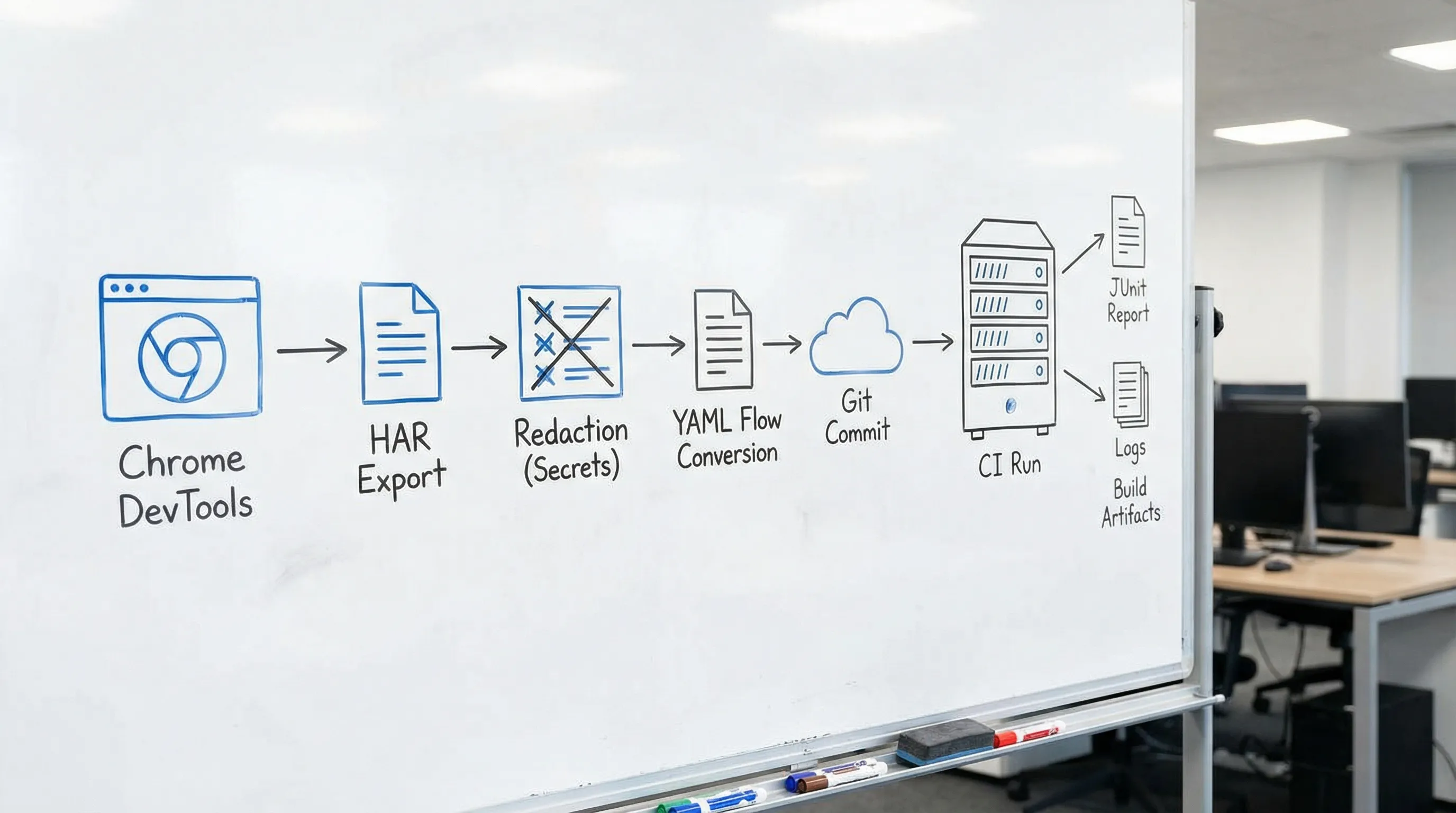
If your end goal is CI signal, the HAR is an intermediate artifact, like a compiler’s IR. Your durable asset is the YAML.
A useful mental model is: HAR in, deterministic YAML out.
| Stage | Input | Output | What gets committed to Git? |
|---|---|---|---|
| 1. Capture | Chrome DevTools Network | Focused HAR | No |
| 2. Sanitize | HAR | Redacted HAR (optional) | Usually no |
| 3. Convert | HAR | Initial YAML flow | Yes |
| 4. Normalize | YAML flow | Deterministic YAML flow | Yes |
| 5. Gate | YAML flow + env | CI run (JUnit/logs) | No (artifacts only) |
DevTools fits naturally here because it converts real browser traffic into native YAML flows that are readable, diffable, and runnable locally or in CI.
Stage 1: Capture only what you can defend in a PR
In Chrome DevTools, it is easy to record “everything”. For CI, record one workflow.
Define your flow boundary up front:
- Start condition: “unauthenticated user” or “fresh session with cookie X”.
- End condition: a stable terminal API response you can assert on.
- Allowed domains: your API and only the minimum required upstreams.
Two practical capture rules that prevent most downstream pain:
- Keep the workflow short. If you cannot describe it in one sentence, it is likely multiple flows.
- Prefer staging with seeded data. Determinism starts with data control, not assertions.
If you need a concrete, safe HAR capture procedure (including what to toggle in Chrome and what not to export), use the DevTools guide: Generate a HAR file in Chrome (Safely).
Stage 2: Sanitize aggressively (assume your HAR will leak)
Experienced teams get burned here once and then never again.
A HAR can contain:
- Authorization headers (Bearer tokens)
- Cookies (session identifiers)
- CSRF tokens
- PII in request or response bodies
- Internal hostnames
Your goal is to ensure that the YAML flow is shareable, and that any sensitive values become environment variables or are derived via chaining.
A sane policy is:
- Do not commit raw HARs.
- If you must store HARs temporarily for debugging, redact them and keep them out of Git.
For concrete redaction guidance, see: How to Redact HAR Files Safely (Keep Tests Shareable, Remove Secrets).
Stage 3: Convert HAR to YAML, then immediately delete “browser noise”
Conversion is where you turn “observed traffic” into “executable intent”. DevTools can import HAR traffic and export a YAML flow that you can version in Git.
Right after conversion, do a first-pass cleanup to remove browser-specific and unstable details.
Typical deletions:
- Tracking and analytics calls
- Third-party requests
- Cache negotiation headers (
If-None-Match,If-Modified-Since) - Headers that change per run (
User-Agent, manysec-*headers) - Any baked-in tokens that should be sourced from env or extracted
The objective is not aesthetic. It is to reduce the diff surface and eliminate false failures.
Stage 4: Make dependencies explicit with request chaining
A browser session is stateful. CI should be explicit.
When you export a YAML flow, you want to express dependencies as direct node output references (token from login, ID from create, cursor from list). This is where YAML-first workflows beat UI recordings.
Here are common chaining patterns that produce stable tests. The YAML below uses the DevTools flow format, but the structure is the important part.
Pattern A: Login, use token, reuse it
env:
  BASE_URL: '{{BASE_URL}}'
  E2E_USER: '{{E2E_USER}}'
  E2E_PASS: '{{E2E_PASS}}'

steps:
  - request:
      name: Login
      method: POST
      url: '{{BASE_URL}}/auth/login'
      headers:
        Content-Type: application/json
      body:
        username: '{{E2E_USER}}'
        password: '{{E2E_PASS}}'

  - js:
      name: ValidateLogin
      code: |
        export default function(ctx) {
          if (ctx.Login?.response?.status !== 200) throw new Error("Login failed");
          if (!ctx.Login?.response?.body?.access_token) throw new Error("No token");
          return { validated: true };
        }
      depends_on: Login

  - request:
      name: GetProfile
      method: GET
      url: '{{BASE_URL}}/me'
      headers:
        Authorization: 'Bearer {{Login.response.body.access_token}}'
      depends_on: Login

  - js:
      name: ValidateProfile
      code: |
        export default function(ctx) {
          if (ctx.GetProfile?.response?.status !== 200) throw new Error("Expected 200");
          if (!ctx.GetProfile?.response?.body?.id) throw new Error("Missing id");
          return { validated: true };
        }
      depends_on: GetProfile
What this buys you:
- No static secrets in Git.
- Reviewable auth behavior.
- A single place to change auth when it evolves.
Pattern B: Create resource, read it back by ID
steps:
  - request:
      name: CreateWidget
      method: POST
      url: '{{BASE_URL}}/widgets'
      headers:
        Authorization: 'Bearer {{Login.response.body.access_token}}'
        Content-Type: application/json
      body:
        name: 'ci-{{RUN_ID}}'

  - js:
      name: ValidateCreate
      code: |
        export default function(ctx) {
          if (ctx.CreateWidget?.response?.status !== 201) throw new Error("Expected 201");
          return { validated: true };
        }
      depends_on: CreateWidget

  - request:
      name: FetchWidget
      method: GET
      url: '{{BASE_URL}}/widgets/{{CreateWidget.response.body.id}}'
      headers:
        Authorization: 'Bearer {{Login.response.body.access_token}}'
      depends_on: CreateWidget

  - js:
      name: ValidateFetch
      code: |
        export default function(ctx) {
          if (ctx.FetchWidget?.response?.status !== 200) throw new Error("Expected 200");
          if (ctx.FetchWidget?.response?.body?.name !== 'ci-' + ctx.RUN_ID) throw new Error("Name mismatch");
          return { validated: true };
        }
      depends_on: FetchWidget
This is the CI-friendly alternative to "copy ID from console and paste into next request". Chaining makes the dependency explicit and prevents brittle fixtures.
Pattern C: CSRF or anti-forgery tokens
Many “recorded” flows fail in CI because CSRF tokens are generated per session and must be replayed correctly.
The repeatable approach:
- Fetch the page or endpoint that issues CSRF.
- Reference the token from the response body or headers of the issuing step.
- Use it explicitly in subsequent mutating requests via
{{NodeName.response.body.field}}.
If you want more concrete examples of chaining node outputs from real HAR traffic, see: HAR → YAML API Test Flow: Auto-Extract Variables + Chain Requests.
Stage 5: Normalize YAML for Git diffs (treat formatting as determinism)
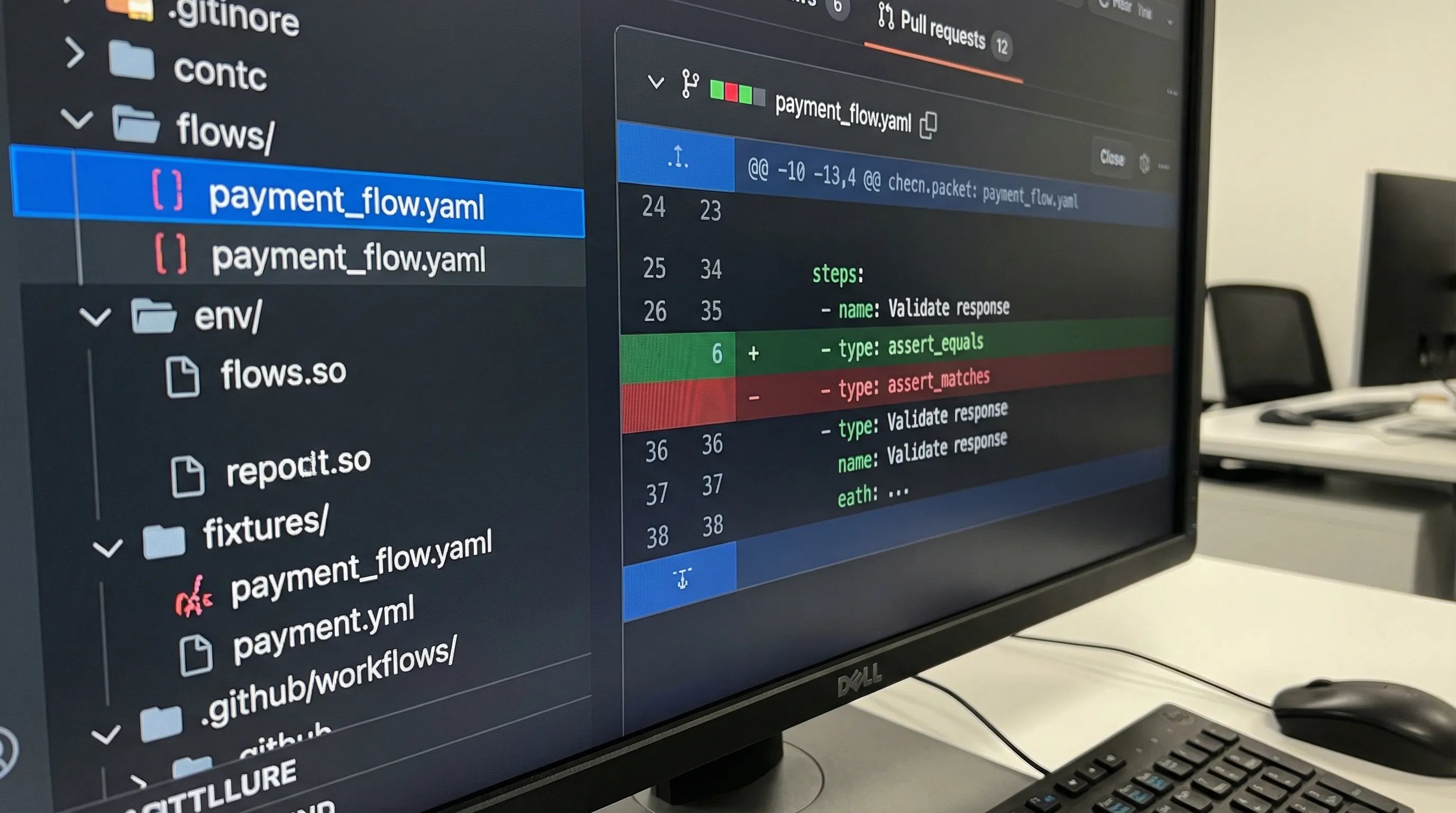
If YAML is your source of truth, you should optimize it for review:
- Stable step names (consider them public API for your tests)
- Stable ordering of keys
- Sorted headers and query params
- No inline maps that reformat constantly
- Environment variables separated from flows
This is not bike-shedding. It is how you keep PRs readable when tests evolve.
For conventions that keep diffs clean, use: YAML API Test File Structure: Conventions for Readable Git Diffs.
Stage 6: Add assertions that survive CI
The fastest way to create flaky tests is to assert exact payloads copied from a single run.
Prefer assertions that express invariants:
- Status codes
- Presence/type checks
- Subset matching for objects
- Normalized timestamps
- Tolerances for floats
Example invariant-style checks using a JS validation node:
steps:
  - request:
      name: ListWidgets
      method: GET
      url: '{{BASE_URL}}/widgets'
      query_params:
        limit: '25'
      headers:
        Authorization: 'Bearer {{Login.response.body.access_token}}'

  - js:
      name: ValidateWidgets
      code: |
        export default function(ctx) {
          const res = ctx.ListWidgets?.response;
          if (res?.status !== 200) throw new Error("Expected 200");
          const items = res?.body?.items;
          if (!Array.isArray(items)) throw new Error("items must be array");
          for (const item of items) {
            if (typeof item.id !== 'string') throw new Error("id must be string");
            if (!/^\d{4}-\d{2}-\d{2}T/.test(item.created_at)) {
              throw new Error("created_at must be ISO timestamp");
            }
          }
          return { count: items.length };
        }
      depends_on: ListWidgets
If you are fighting flakes, the most effective move is usually to stop snapshotting unstable fields and start normalizing. A focused reference: Deterministic API Assertions: Stop Flaky JSON Tests in CI.
Stage 7: Wire it into GitHub Flow and CI as a merge gate
A repeatable pipeline ends with the flow running in CI, on every PR, against a known environment.
At minimum, you want:
- The YAML flow in Git.
- Secrets injected via CI secret store.
- CI produces JUnit and logs as artifacts.
- Failures are attributable to a specific step name.
A minimal CI posture is:
- PR checks: smoke suite (fast, high signal)
- Main branch or nightly: broader regression suite
DevTools already has a practical GitHub Actions template for this approach. Instead of duplicating it here, use: API regression testing in GitHub Actions.
One important operational detail: pin tool versions. If your runner changes behavior, your tests did not regress, your harness did. For CI hygiene, see: Pinning GitHub Actions + Tool Versions: Stop CI Breakage (DevTools Included).
What makes this pipeline better than Postman, Newman, or Bruno
The main difference is not “features”. It is where your truth lives.
Postman + Newman
Postman collections are not native YAML. They are a JSON export with Postman-specific structure, plus a lot of state that lives in the app (or in scripts). In practice:
- Reviews are noisy (large JSON diffs, ordering issues).
- Logic drifts into scripts and pre-request hooks.
- CI (Newman) works, but test readability and refactoring cost get worse as suites grow.
If you are currently using Newman primarily as a CI runner for collections, DevTools positions itself explicitly as a replacement path, with Git-first YAML flows: Newman alternative for CI: DevTools CLI.
Bruno
Bruno improves the “store requests in Git” story, but it still uses its own file format (.bru) rather than plain YAML. That creates a portability trade-off:
- You still have a custom DSL to standardize and teach.
- Tooling and transforms outside the ecosystem are harder.
DevTools (YAML-first)
With YAML-first flows:
- Tests are reviewable as code in PRs.
- Request chaining is explicit and diffable.
- CI wiring is straightforward because the runner consumes a stable text format.
This is why the HAR capture step matters. It gives you realism, then YAML gives you long-term maintainability.
Common failure modes, and how to design them out
Most “recorded traffic” test suites fail for predictable reasons. Designing your pipeline around them is what makes it repeatable.
| Failure mode | Symptom in CI | Design fix |
|---|---|---|
| Secrets baked into capture | 401s after token expires, leaks in Git | Replace with env vars or chain login/token |
| Order-dependent state | Works locally, fails in parallel CI | Create unique resources per run, clean up, avoid shared fixtures |
| Unstable headers/cookies | Random 403/400 | Capture only necessary headers, model session explicitly |
| Time-dependent fields | Snapshot diffs, flaky assertions | Normalize, assert patterns and invariants |
| Rate limits | 429 spikes in CI | Throttle concurrency, backoff policy, isolate test accounts |
If your goal is regression signal, treat each fix as a permanent pipeline rule, not a local tweak.
A pragmatic repo layout for the pipeline
Keep the contract simple: flows in Git, secrets outside Git.
repo/
  flows/
    auth/
    widgets/
  env/
    staging.env.example
  fixtures/
  .github/workflows/
This layout aligns with PR review, CODEOWNERS, and CI artifacts, and it prevents the common drift where “tests” become a mix of exports, screenshots, and tribal knowledge.
Putting it together: the repeatable loop
A pipeline is only real if it can be repeated by someone else on your team.
The loop you want is:
- Developer captures Network traffic for a single workflow in Chrome.
- Convert to YAML flow.
- Normalize and chain dependencies.
- Add invariants as JS validation nodes.
- Open PR, review the YAML diff.
- CI runs the flow and produces artifacts.
Once that loop is reliable, scaling is just adding flows and sharding execution, not reinventing how tests are authored.
If you already have Postman collections, you can mix the same approach (record HAR or export, then translate into reviewable YAML flows) using the migration guide: Migrate from Postman to DevTools.
The YAML flows this pipeline produces are end-to-end API tests: chained requests with real data flowing between steps. For a deeper look at structuring these multi-step workflows, see the complete guide.